Backend · Message queues & events
Kafka with Node.js and TypeScript: from the first event to exactly-once in production
A complete, tested guide for Node.js and TypeScript developers: why Kafka exists, how partitions, replication and KRaft work, then producers, consumer groups, KIP-848 rebalancing, exactly-once transactions, retries and DLQs, schemas, the outbox pattern, security and Kubernetes.

70 min read
Most JavaScript developers meet Kafka the same way: a new job, a new codebase, and a service that doesn't call other services. It just writes something called an event to something called a topic, and five other services somehow react. This guide is the map I wish existed for that moment. It starts from zero, with what problem Kafka solves and the handful of words you need, then builds a real event-driven backend in TypeScript and keeps going into the parts most tutorials skip: rebalancing, exactly-once processing, retries and dead-letter topics, schemas, the outbox pattern, security, testing and running Kafka on Kubernetes. Every piece of code in it was compiled and its tests were run.Source [1]
Transcript
Part 1: Why Kafka exists
A ride-hailing app, the synchronous way
Picture a ride-hailing app called Ridely. When a trip ends, a lot has to happen: calculate the fare, charge the rider, pay the driver, email a receipt, update the driver's rating prompt, feed the fraud model, refresh the city's demand dashboard and write a row for the finance team. The first version does what most of us would do. The trip service ends the trip and then calls each of those services over HTTP, one after another.
It works on a quiet Tuesday. Then four things go wrong, usually in this order:
It gets slow. The rider waits for the slowest of eight calls before the app says the trip has ended.
It breaks in chains. When the email provider has an outage, the receipt call times out, the trip service retries, its threads fill up, and soon trips can't end at all. One broken service takes down one that has nothing to do with email.
It loses work. If the trip service crashes after charging the rider but before paying the driver, which calls happened? Nobody knows without digging through logs.
It can't grow. A new team wants trip data for a loyalty programme. They have to ask the trip team to add a ninth call, deploy it, and own its failures. Every new reader of the data is a change to the writer.
The underlying problem is coupling. The trip service knows who needs to hear about a trip, waits for all of them, and fails when any of them fails. Now add a second kind of data: every driver's phone reports its position once a second. With 50,000 drivers online that's 50,000 small messages a second, all day, and several services want them: matching, ETAs, surge pricing, analytics. No HTTP API fan-out survives that.
The event-driven way
Turn it around. When a trip ends, the trip service writes one record, a fact, to a durable log: TripEnded for trip trip-1001, 6.2 km, 18 minutes. That's all it does, and it's done in a few milliseconds. Every interested service reads that log at its own pace and does its own job. The fare service calculates the fare. The receipt service sends an email. If the email provider is down, only receipts are late; the receipt service catches up when the provider comes back, because the log kept every event. When the loyalty team arrives, they start reading the same log, from the beginning if they like, and the trip team doesn't change a line.
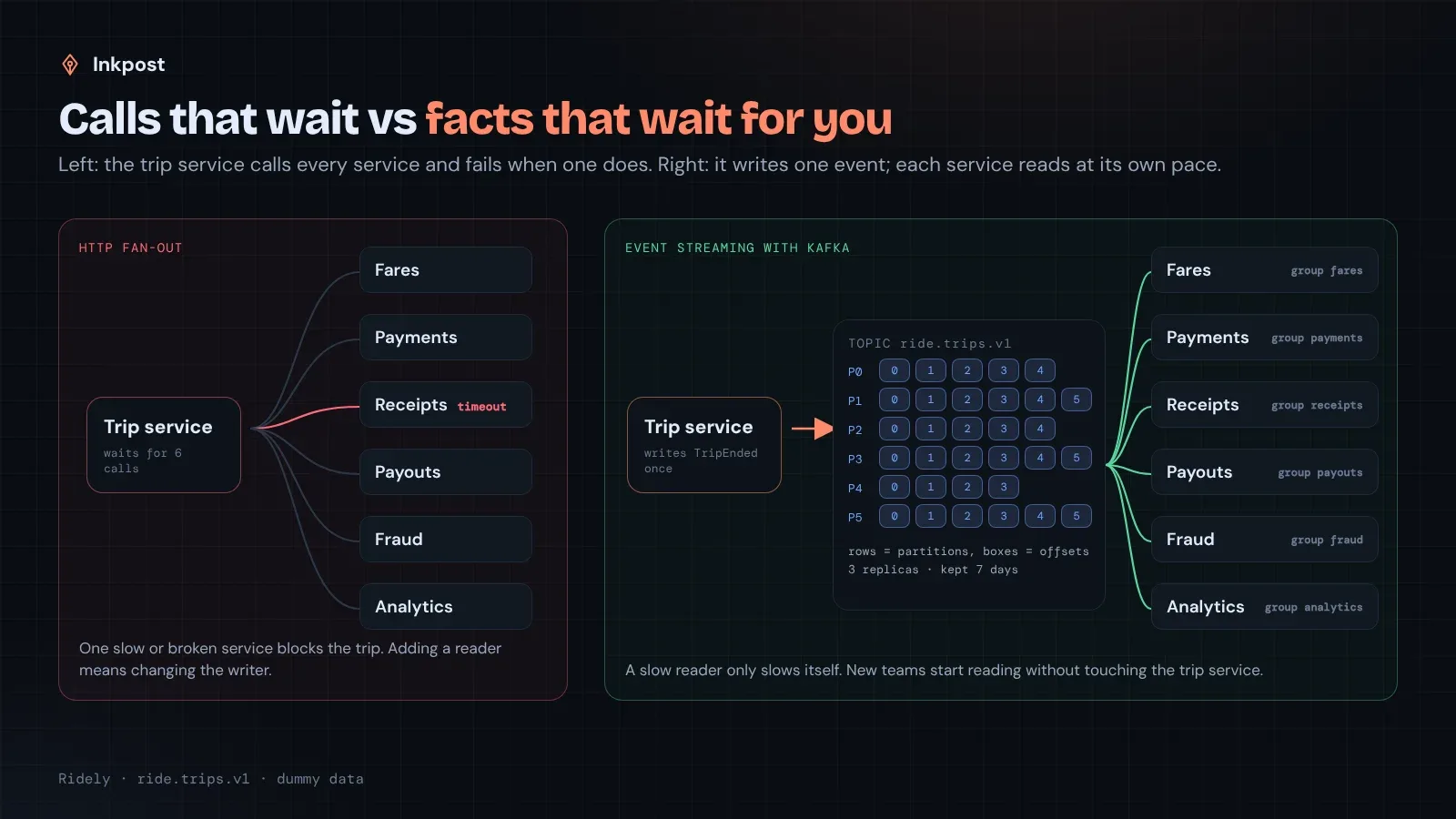
That's event streaming: recording what happens as a continuous stream of events, storing those streams durably, and letting any number of applications process them in real time or later. Apache Kafka is the most widely used system for doing it. It was created at LinkedIn around 2010, became an Apache project, and is now open source under the Apache 2.0 licence.Source [3]
More than 80% of all Fortune 100 companies trust, and use Apache Kafka.Source [4]
kafka.apache.org
Events, commands and messages
Three words get mixed up constantly, and the difference shapes your design:
Term | Meaning | Example | Who decides what happens |
|---|---|---|---|
Event | A fact: something that already happened. Named in the past tense. Can't be rejected. |
| Each reader decides for itself |
Command | A request for something to happen. Can be refused. |
| The sender expects one specific receiver to act |
Message | The envelope that carries either one over the wire | A Kafka record | Depends on what's inside |
Kafka is at its best carrying events. Because an event is a fact, the producer doesn't need to know or care who reads it, and that's exactly what removes the coupling. You can send commands over Kafka too, but if you find yourself waiting for a reply to each one, you're rebuilding HTTP on top of a log, and you'll get the downsides of both.
Where Kafka shows up
Use case | What flows through Kafka | Ridely example |
|---|---|---|
Microservice communication | Business events between services | TripEnded drives fares, receipts and payouts |
Activity and telemetry streams | Very high volumes of small events | Driver GPS pings every second |
Log and metrics aggregation | Application logs and metrics on their way to storage | Every service's logs to the observability stack |
Change data capture (CDC) | Every row change in a database | Trip table changes to the search index |
Data integration | Data moving between systems via connectors | Fares to the data warehouse and object storage |
Stream processing | Continuous calculations over events | Live demand per city area for surge pricing |
Event sourcing and audit | The full history of changes, kept as the source of truth | Every state change of a payout, for audit |
Feeding AI and ML | Fresh features and context for models and agents | Real-time fraud scoring on each payment |
What Kafka is not
Not a database you query. You can't ask Kafka for all trips by driver 42. You read streams in order and build your own views in a database.
Not a classic job queue, at least not by default. Each partition is read in order by one member of a group, so one slow message holds up the ones behind it. Kafka 4.2 added real queue semantics as share groups, covered later, but most clients, including every JavaScript one, don't support them yet.
Not a request-response system. It's built for fire-and-forget facts, not for waiting on an answer.
Not free to run. A production cluster is a distributed system with disks, replication and upgrades. Many teams pay for a managed service instead.
Kafka compared with other messaging tools
The question in every design review is: why not RabbitMQ, SQS or Redis? They solve overlapping but different problems. The big difference is that Kafka keeps messages after they are read, so many independent readers can read the same data and anyone can replay it.
Kafka | RabbitMQ | Amazon SQS / SNS | Redis Streams | |
|---|---|---|---|---|
Model | Partitioned, replicated log | Broker with queues and exchanges | Managed queue / pub-sub | Append-only stream in memory |
After a message is read | Stays until retention expires | Removed when acknowledged (classic queues) | Removed when deleted | Stays until trimmed |
Replay old data | Yes, by moving an offset | Only with Streams | No | Yes, by id |
Many independent readers | Yes, each group has its own position | Needs a queue per reader | Via SNS fan-out | Yes, consumer groups |
Ordering | Per partition (per key) | Per queue | FIFO queues only | Per stream |
Throughput | Very high, scales with partitions and brokers | High | High, managed | High, bounded by memory |
Best at | Event streams, many consumers, replay, integration | Task queues, flexible routing | Simple queues with zero operations | Lightweight streams near a cache |
A useful rule of thumb: if the data is a stream of facts that several teams will read, possibly later and possibly again, reach for Kafka. If it's a list of jobs where each one should be done once by any free worker and then forgotten, a queue is simpler.
Part 2: The core ideas, one at a time
The vocabulary
Kafka has a small vocabulary. Learn these words and the documentation starts to make sense.
Term | What it is | Ridely example |
|---|---|---|
Record (message, event) | One entry in the log: a key, a value, headers and a timestamp. Key and value are just bytes to Kafka. | key |
Topic | A named stream of records, like a table name for events |
|
Partition | A topic is split into partitions. Each partition is an ordered, append-only log stored on disk. |
|
Offset | The position of a record inside its partition: 0, 1, 2... Never reused. | partition 4, offset 3 |
Broker | A Kafka server. Stores partitions and serves reads and writes. | kafka-1, kafka-2, kafka-3 |
Cluster | A group of brokers working together | The three containers in our docker-compose file |
Producer | A client that writes records | The trip service |
Consumer | A client that reads records | The notification service |
Consumer group | Consumers sharing the work of reading a topic. Each partition goes to one member. | Group |
Replica | A copy of a partition on another broker. One is the leader, the rest are followers. | Each partition has 3 replicas |
ISR (in-sync replicas) | The replicas that are fully caught up with the leader | Usually all 3 |
Controller | Manages cluster metadata: which broker leads which partition, topic configs, membership. Runs as a KRaft quorum. | Every node is also a controller in our setup |
Topics, partitions and offsets
Think of a partition as a file you can only append to. A producer adds a record at the end, Kafka gives it the next offset, and that record never changes. A consumer reads from an offset forwards. Because writes are appends and reads are sequential, a single broker sustains very high throughput on ordinary disks, helped by the operating system's page cache.
Partitions are how Kafka scales. One partition lives on one broker (its leader) and is read by at most one member of each consumer group, so a topic with 6 partitions can be written by 6 brokers in parallel and read by up to 6 consumers in a group. Partitions are also the unit of ordering: Kafka guarantees order within a partition, never across a whole topic.
How a key chooses a partition
When a record has a key, the producer hashes the key and takes it modulo the number of partitions. Same key, same hash, same partition, as long as the partition count doesn't change. When a record has no key, modern clients use a sticky partitioner: they fill a batch for one partition, then move to another, which gives bigger batches than strict round-robin.
Storage: Kafka doesn't delete what you read
A common first assumption is that a message disappears once it's consumed, as it does in a classic queue. In Kafka it doesn't. Reading is just moving your own bookmark, the offset. The data stays until the topic's cleanup policy removes it, which is why a new service can read last week's events and why you can replay after fixing a bug.
Each partition is stored as a series of segment files. Kafka writes to the newest (active) segment, and when it reaches segment.bytes (1 GiB by default) or segment.ms it rolls to a new one. Cleanup works on whole closed segments, using one of two policies:
cleanup.policy | What gets removed | Use it for | Key settings (defaults) |
|---|---|---|---|
delete (default) | Whole segments older than the retention time or beyond the size limit | Event streams: trips, payments, logs |
|
compact | Older records for a key once a newer record with the same key exists. A record with a null value (a tombstone) deletes the key. | Latest state per key: driver status, user profile, config |
|
compact,delete | Both: compacts, and also drops old segments | Latest state, but only for a bounded time | Both sets |
A compacted topic behaves like a table that's also a changelog: replay it from the start and you end up with the latest value for every key. That's how Kafka stores consumer offsets internally, and how stream processors keep their state.
Tiered storage, and what's coming
Keeping months of data on broker disks is expensive. Tiered storage (KIP-405) lets brokers move older closed segments to object storage such as Amazon S3 while keeping recent ones local; consumers read old data through the broker as usual. It became production-ready in Kafka 3.9 and is enabled per topic with remote.storage.enable. Kafka 4.4 adds a delayed-upload option (KIP-1241) so segments that are about to be deleted anyway don't have to be uploaded.Source [5]
The next step is further out. KIP-1150, Diskless Topics, was accepted by the Kafka community on 2 March 2026. Diskless topics would write data straight to object storage instead of replicating it between brokers, mainly to cut the cost of cross-zone replication in the cloud. The detailed designs are still separate proposals in progress, so treat it as direction, not something to plan production around yet.Source [6]
Replication, acks and how not to lose data
Each partition has a replication factor, usually 3: one leader and two followers on different brokers. Producers and consumers talk to the leader. Followers copy from the leader, and the ones that are caught up form the in-sync replica set (ISR). If the leader's broker dies, the controller promotes a follower from the ISR, and clients move to it automatically.
How safe a write is depends on two settings working together: the producer's acks and the topic's min.insync.replicas.
Producer acks | The broker confirms when | Can lose data if | Use for |
|---|---|---|---|
0 | Never; the producer doesn't wait | Anything goes wrong | Metrics you can afford to drop |
1 | The leader has written it | The leader dies before followers copy it | Rarely worth it today |
all (-1), the default since Kafka 3.0 | Every replica in the ISR has it, and the ISR has at least min.insync.replicas members | More brokers fail than you allowed for | Anything that matters |
With acks=all, replication factor 3 and min.insync.replicas=2, every confirmed write is on at least two brokers, and the cluster keeps accepting writes with one broker down. With two down, writes to that partition fail with a not-enough-replicas error rather than silently becoming unsafe. That trade, refusing writes instead of risking them, is the right default for business data.
KRaft: Kafka without ZooKeeper
For most of Kafka's life, a separate ZooKeeper cluster stored its metadata. That meant two systems to run, secure and upgrade, and it limited how many partitions a cluster could handle. KRaft replaces it with Kafka's own Raft-based quorum: a few nodes take the controller role and keep the metadata in an internal, replicated log.
Kafka 4.0, released on 18 March 2025, removed ZooKeeper entirely. Every 4.x cluster runs in KRaft mode, and old guides that start a ZooKeeper container are out of date. Each node has a process.roles setting: broker, controller, or both. Small and development clusters run combined nodes, as in our compose file; larger production clusters usually run three or five dedicated controllers apart from the brokers, so a busy broker can't slow down metadata changes.Source [7]
Kafka version | Date | What changed that you'll notice |
|---|---|---|
3.9 | November 2024 | Last 3.x feature release and the last with ZooKeeper; tiered storage production-ready |
4.0 | March 2025 | ZooKeeper removed; new consumer group protocol (KIP-848) generally available; Queues for Kafka in early access; producer |
4.1 | September 2025 | Queues for Kafka moved to preview |
4.2 | February 2026 | Queues for Kafka (share groups) production-ready, with a RENEW acknowledgement for long work |
4.3 | May 2026 | Logs a warning recommending the new consumer protocol over the classic one |
4.4 | October 2026 | Dead-letter queues for share groups (KIP-1191); async bootstrap address resolution (KIP-909); delayed tiered-storage upload (KIP-1241); clearer transaction offset-commit errors (KIP-1319) |
Part 3: Kafka from Node.js, hands-on
Time to build. We'll write the Ridely backend in TypeScript: a location producer for the GPS firehose, a trip producer, a notification consumer with retries and a dead-letter topic, a fare calculator that processes each trip exactly once, an Avro contract enforced by a Schema Registry, a lag checker and a test suite. The whole project type-checks under strict TypeScript 7, and its tests pass against a three-broker in-process cluster with both consumer group protocols.
Choosing a client library
Kafka speaks its own binary protocol over TCP, so you need a client library. The official Apache clients are Java. For Node.js there are four serious options in 2026, and picking the right one up front saves a painful migration later.
Library | Built on | Status (Nov 2026) | Strengths | Watch out for |
|---|---|---|---|---|
@confluentinc/kafka-javascript 1.11.0 | librdkafka 2.16.0 (native C, prebuilt binaries) | Officially supported by Confluent; frequent releases | Fast and mature core; KafkaJS-style promise API; transactions; new consumer protocol (KIP-848); separate Schema Registry client | Native addon: needs a supported OS/Node combination (Node 18 to 24); some librdkafka defaults differ from Java |
kafkajs 2.2.4 | Pure JavaScript | Last release February 2023; community maintained | Easy to install anywhere; huge number of tutorials; used by NestJS's Kafka transport | No KIP-848 support, no new 4.x features; slower on heavy loads |
@platformatic/kafka 2.20.0 | Pure TypeScript, no native code | Active | No native addon; modern API; supports Kafka 3.5 to 4.2 protocol features including KIP-848 and transactions; OpenTelemetry package | Younger project; needs Node 22.22+ or 24.6+ |
node-rdkafka 3.6.1 | librdkafka | Maintained | Callback and stream API close to librdkafka | Older-style API; the Confluent client is its successor |
This guide uses @confluentinc/kafka-javascript. Its KafkaJS namespace mirrors the KafkaJS API, so most KafkaJS examples you find translate directly, and it gives you librdkafka's speed and up-to-date protocol support. The project's MIGRATION.md walks through moving an existing KafkaJS app across: the main change is that KafkaJS options go inside a kafkaJS: {} block, and any librdkafka property can sit next to it at the top level.
Run a cluster locally
The official apache/kafka Docker image starts a working single-node cluster with no configuration at all, which is perfect for a first look:
# Fastest possible start: one node that is both broker and KRaft controllerdocker run -d --name kafka -p 9092:9092 apache/kafka:4.4.0# The image ships the standard CLI tools in /opt/kafka/bindocker exec -it kafka /opt/kafka/bin/kafka-topics.sh \ --bootstrap-server localhost:9092 --create --topic hello --partitions 3# Type a few lines, then Ctrl+Cdocker exec -it kafka /opt/kafka/bin/kafka-console-producer.sh \ --bootstrap-server localhost:9092 --topic hello# Read them back from the start of the log (Ctrl+C to stop)docker exec -it kafka /opt/kafka/bin/kafka-console-consumer.sh \ --bootstrap-server localhost:9092 --topic hello --from-beginningFor real development you want three nodes, so replication, leader election and min.insync.replicas actually mean something. This compose file runs three combined broker-and-controller nodes in KRaft mode, plus a Schema Registry and kafbat's open-source web UI:
# docker-compose.yml - 3-node KRaft cluster (no ZooKeeper), Schema Registry and a web UIx-kafka-env: &kafka-env KAFKA_PROCESS_ROLES: broker,controller # each node is broker + KRaft controller KAFKA_CONTROLLER_QUORUM_VOTERS: 1@kafka-1:9093,2@kafka-2:9093,3@kafka-3:9093 KAFKA_CONTROLLER_LISTENER_NAMES: CONTROLLER KAFKA_LISTENER_SECURITY_PROTOCOL_MAP: CONTROLLER:PLAINTEXT,INTERNAL:PLAINTEXT,EXTERNAL:PLAINTEXT KAFKA_LISTENERS: INTERNAL://:19092,CONTROLLER://:9093,EXTERNAL://:9092 KAFKA_INTER_BROKER_LISTENER_NAME: INTERNAL CLUSTER_ID: 4L6g3nShT-eMCtK--X86sw # any base64 UUID; same on every node KAFKA_DEFAULT_REPLICATION_FACTOR: 3 KAFKA_MIN_INSYNC_REPLICAS: 2 KAFKA_OFFSETS_TOPIC_REPLICATION_FACTOR: 3 KAFKA_TRANSACTION_STATE_LOG_REPLICATION_FACTOR: 3 KAFKA_TRANSACTION_STATE_LOG_MIN_ISR: 2 KAFKA_SHARE_COORDINATOR_STATE_TOPIC_REPLICATION_FACTOR: 3 KAFKA_SHARE_COORDINATOR_STATE_TOPIC_MIN_ISR: 2 KAFKA_AUTO_CREATE_TOPICS_ENABLE: "false" # typos must fail, not create topics KAFKA_GROUP_INITIAL_REBALANCE_DELAY_MS: 0 KAFKA_LOG_DIRS: /var/lib/kafka/dataservices: kafka-1: image: apache/kafka:4.4.0 hostname: kafka-1 ports: ["29092:9092"] environment: <<: *kafka-env KAFKA_NODE_ID: 1 KAFKA_ADVERTISED_LISTENERS: INTERNAL://kafka-1:19092,EXTERNAL://localhost:29092 volumes: ["kafka-1:/var/lib/kafka/data"] kafka-2: image: apache/kafka:4.4.0 hostname: kafka-2 ports: ["39092:9092"] environment: <<: *kafka-env KAFKA_NODE_ID: 2 KAFKA_ADVERTISED_LISTENERS: INTERNAL://kafka-2:19092,EXTERNAL://localhost:39092 volumes: ["kafka-2:/var/lib/kafka/data"] kafka-3: image: apache/kafka:4.4.0 hostname: kafka-3 ports: ["49092:9092"] environment: <<: *kafka-env KAFKA_NODE_ID: 3 KAFKA_ADVERTISED_LISTENERS: INTERNAL://kafka-3:19092,EXTERNAL://localhost:49092 volumes: ["kafka-3:/var/lib/kafka/data"] schema-registry: image: confluentinc/cp-schema-registry:8.4.1 depends_on: [kafka-1, kafka-2, kafka-3] ports: ["8081:8081"] environment: SCHEMA_REGISTRY_HOST_NAME: schema-registry SCHEMA_REGISTRY_KAFKASTORE_BOOTSTRAP_SERVERS: kafka-1:19092,kafka-2:19092,kafka-3:19092 SCHEMA_REGISTRY_LISTENERS: http://0.0.0.0:8081 kafka-ui: image: ghcr.io/kafbat/kafka-ui:v1.5.1 depends_on: [kafka-1, schema-registry] ports: ["8080:8080"] environment: KAFKA_CLUSTERS_0_NAME: local KAFKA_CLUSTERS_0_BOOTSTRAPSERVERS: kafka-1:19092,kafka-2:19092,kafka-3:19092 KAFKA_CLUSTERS_0_SCHEMAREGISTRY: http://schema-registry:8081volumes: kafka-1: kafka-2: kafka-3:# Three-node cluster + Schema Registry + UI (docker-compose.yml below)docker compose up -ddocker compose ps# Who is the active KRaft controller, and is the quorum healthy?docker compose exec kafka-1 /opt/kafka/bin/kafka-metadata-quorum.sh \ --bootstrap-server kafka-1:19092 describe --status# Web UI: http://localhost:8080 Schema Registry: http://localhost:8081Each broker has two client-facing listeners. Containers talk to each other on INTERNAL (kafka-1:19092), and your Node apps on the host use EXTERNAL (localhost:29092 and friends). The advertised listener is the address a broker hands back to clients, and getting it wrong is the most common reason a client connects once and then hangs: the broker tells it to reconnect to an address it can't reach.
Project setup
mkdir ride-events && cd ride-eventsnpm init -y && npm pkg set type=module# Kafka client (bundles a prebuilt librdkafka) and the Schema Registry clientnpm i @confluentinc/kafka-javascript@1.11.0 @confluentinc/schemaregistry@1.11.0npm i -D typescript@7 tsx @types/nodenpx tsx src/admin/create-topics.ts{ "compilerOptions": { "target": "ES2023", "module": "NodeNext", "moduleResolution": "NodeNext", "strict": true, "esModuleInterop": true, "skipLibCheck": true, "experimentalDecorators": true, "emitDecoratorMetadata": true, "outDir": "dist" }, "include": ["src", "test"]}One small module owns the connection. Everything else imports kafka and the topic names from it, so switching from local to a managed cluster is an environment change, not a code change:
// src/kafka.ts - one place that knows how to reach the clusterimport { KafkaJS } from '@confluentinc/kafka-javascript';const { Kafka, logLevel } = KafkaJS;const brokers = (process.env.KAFKA_BROKERS ?? 'localhost:29092,localhost:39092,localhost:49092').split(',');const useSasl = process.env.KAFKA_SASL_USERNAME !== undefined;export const kafka = new Kafka({ kafkaJS: { clientId: process.env.SERVICE_NAME ?? 'ride-events', brokers, logLevel: logLevel.WARN, // Managed clusters (Confluent Cloud, MSK, Aiven...) need TLS + SASL ...(useSasl && { ssl: true, sasl: { mechanism: 'scram-sha-512', username: process.env.KAFKA_SASL_USERNAME!, password: process.env.KAFKA_SASL_PASSWORD!, }, }), },});export const TOPICS = { locations: 'ride.locations.v1', trips: 'ride.trips.v1', fares: 'ride.fares.v1', tripsRetry: 'ride.trips.retry.v1', tripsDlq: 'ride.trips.dlq.v1', driverStatus: 'driver.status.v1',} as const;/** Run `fn` on SIGINT/SIGTERM so Kubernetes and Ctrl+C both shut down cleanly. */export function onShutdown(fn: () => Promise<void>): void { let closing = false; for (const signal of ['SIGINT', 'SIGTERM'] as const) { process.once(signal, async () => { if (closing) return; closing = true; try { await fn(); } finally { process.exit(0); } }); }}Every script reads its connection from the environment. To point any of them at another cluster, set the variables first; for the local compose cluster the defaults already match:
KAFKA_BROKERS=localhost:29092,localhost:39092,localhost:49092 SERVICE_NAME=trip-service npx tsx src/producer/trip-producer.tsThe event types are the contract between services. Keeping them in one shared module (or package) means the compiler catches a producer and consumer drifting apart:
// src/types.ts - the event contracts every service sharesexport interface LocationPing { driverId: string; lat: number; lng: number; speedKmh: number; at: string; // ISO-8601, set by the phone}export type TripEvent = | { type: 'TripRequested'; tripId: string; riderId: string; pickup: [number, number]; at: string } | { type: 'TripAccepted'; tripId: string; driverId: string; etaMinutes: number; at: string } | { type: 'TripStarted'; tripId: string; driverId: string; at: string } | { type: 'TripEnded'; tripId: string; driverId: string; distanceKm: number; durationMin: number; at: string };export interface FareCalculated { tripId: string; amount: number; currency: 'INR'; commission: number; driverPayout: number; calculatedAt: string;}Topic names carry a version suffix, .v1. If an event ever has to change in a way old readers can't handle, you publish to .v2 alongside, migrate readers, and retire .v1. It's much cheaper than coordinating a big-bang switch.
Create topics with the admin client
// src/admin/create-topics.ts - topics are infrastructure: create them on purpose, never by accidentimport { kafka, TOPICS } from '../kafka.js';const DAY = 24 * 60 * 60 * 1000;const admin = kafka.admin();await admin.connect();const created = await admin.createTopics({ topics: [ { topic: TOPICS.locations, // very high volume, only useful for a day numPartitions: 12, replicationFactor: 3, configEntries: [ { name: 'retention.ms', value: String(1 * DAY) }, { name: 'min.insync.replicas', value: '2' }, { name: 'compression.type', value: 'producer' }, ], }, { topic: TOPICS.trips, // business facts: keep a week for replays numPartitions: 6, replicationFactor: 3, configEntries: [ { name: 'retention.ms', value: String(7 * DAY) }, { name: 'min.insync.replicas', value: '2' }, ], }, { topic: TOPICS.fares, numPartitions: 6, replicationFactor: 3, configEntries: [{ name: 'min.insync.replicas', value: '2' }], }, { topic: TOPICS.tripsRetry, numPartitions: 6, replicationFactor: 3 }, { topic: TOPICS.tripsDlq, // failed events wait here for a human: keep them for 30 days numPartitions: 1, replicationFactor: 3, configEntries: [{ name: 'retention.ms', value: String(30 * DAY) }], }, { topic: TOPICS.driverStatus, // "latest value per key" table: compacted, kept forever numPartitions: 6, replicationFactor: 3, configEntries: [ { name: 'cleanup.policy', value: 'compact' }, { name: 'min.compaction.lag.ms', value: String(60 * 60 * 1000) }, ], }, ],});console.log(created ? 'topics created' : 'topics already existed');console.table(await admin.fetchTopicMetadata({ topics: Object.values(TOPICS) }).then((t) => t.map(({ name, partitions }) => ({ name, partitions: partitions.length }))));await admin.disconnect();Each topic is configured for how its data is used. Location pings are huge in volume and stale within minutes, so they keep one day. Trip events are business facts that services may need to replay, so they keep a week. The dead-letter topic keeps 30 days because a human has to look at it. And driver status is compacted, because we only ever need each driver's latest status.
Topic | Partitions | Retention | Why |
|---|---|---|---|
ride.locations.v1 | 12 | 1 day | Highest volume; room for 12 parallel consumers |
ride.trips.v1 | 6 | 7 days | Business events; replays after bugs |
ride.fares.v1 | 6 | 7 days (default) | Output of the fare calculator |
ride.trips.retry.v1 | 6 | 7 days (default) | Delayed retries, same keys as trips |
ride.trips.dlq.v1 | 1 | 30 days | Low volume, read by people |
driver.status.v1 | 6 | Compacted | Latest status per driver |
Producers in depth
What happens when you call send()
send() doesn't fire one network request per message. The client serialises your record, picks a partition, and appends it to an in-memory batch for that partition. A background thread sends batches to each partition's leader when a batch is full (batch.size) or has waited long enough (linger.ms), whichever comes first. The broker appends the batch, replicates it according to acks, and replies. Only then does your promise resolve. Batching plus compression is why Kafka is fast, so the main producer tuning knobs are about how long to wait and how big to let batches get.
Setting | Default | What it does |
|---|---|---|
acks | all (-1) | How many replicas must confirm. Keep all for business data. |
enable.idempotence (kafkaJS: idempotent) | true in Java; false in librdkafka, so set it | Broker de-duplicates retries using a producer id and sequence numbers, so a retried batch isn't written twice or out of order |
linger.ms | 5 (since Kafka 4.0; also librdkafka) | How long to wait for more records before sending a batch. Higher means bigger batches and more throughput; lower means less latency. |
batch.size | 16384 bytes (Java) | Upper bound of a batch per partition |
compression.type | none | zstd or lz4 usually shrink JSON 3 to 5 times; compression happens per batch, so it works best with linger |
delivery.timeout.ms | 120000 | Total time a send may take including retries before it fails |
max.in.flight.requests.per.connection | 5 | Up to 5 is safe with idempotence; ordering is still kept |
The location firehose
Our first producer simulates 50 drivers' phones sending a position every second. It's tuned for throughput: zstd compression, a 20 ms linger and 256 KiB batches. The key is the driver id, so each driver's pings stay in order.
// src/producer/location-producer.ts - drivers' phones report their position every secondimport { KafkaJS } from '@confluentinc/kafka-javascript';import { kafka, onShutdown, TOPICS } from '../kafka.js';import type { LocationPing } from '../types.js';const producer = kafka.producer({ kafkaJS: { idempotent: true, // no duplicates or reordering from retries (needs acks = all) acks: -1, // -1 = all in-sync replicas must have the write compression: KafkaJS.CompressionTypes.ZSTD, }, 'linger.ms': 20, // wait up to 20 ms to fill bigger batches 'batch.size': 256 * 1024, // ...or until a partition's batch reaches 256 KiB});await producer.connect();onShutdown(async () => { clearInterval(timer); await producer.flush({ timeout: 10_000 }); // deliver what is still buffered await producer.disconnect();});const DRIVERS = Array.from({ length: 50 }, (_, i) => `drv-${String(i + 1).padStart(3, '0')}`);let sent = 0;const timer = setInterval(async () => { const pings: LocationPing[] = DRIVERS.map((driverId) => ({ driverId, lat: 22.5726 + (Math.random() - 0.5) / 50, lng: 88.3639 + (Math.random() - 0.5) / 50, speedKmh: Math.round(Math.random() * 60), at: new Date().toISOString(), })); try { await producer.send({ topic: TOPICS.locations, messages: pings.map((p) => ({ key: p.driverId, // same driver -> same partition -> in order value: JSON.stringify(p), headers: { 'content-type': 'application/json', 'schema-version': '1' }, })), }); sent += pings.length; if (sent % 1000 === 0) console.log(`sent ${sent} pings`); } catch (err) { // after retries ran out (delivery.timeout.ms). Location data is disposable, so log and move on. console.error('send failed', err); }}, 1000);Business events with headers
Trip events are lower volume but matter more, so this producer keeps the defaults for latency and adds headers. Headers are key-value metadata that travel with a record without being part of its body: a unique event id for de-duplication, the event type for routing, and a trace id so a request can be followed across services.
// src/producer/trip-producer.ts - the booking service publishes facts about each tripimport { randomUUID } from 'node:crypto';import { kafka, TOPICS } from '../kafka.js';import type { TripEvent } from '../types.js';export const tripProducer = kafka.producer({ kafkaJS: { idempotent: true, acks: -1 } });/** Publish one trip event. Key = tripId, so every event of a trip stays in order. */export async function publishTrip(event: TripEvent, traceId: string = randomUUID()) { const [meta] = await tripProducer.send({ topic: TOPICS.trips, messages: [ { key: event.tripId, value: JSON.stringify(event), headers: { 'event-id': randomUUID(), 'event-type': event.type, 'trace-id': traceId }, }, ], }); return meta; // { topicName, partition, baseOffset, ... }}// Run directly: simulate three complete tripsif (import.meta.url === `file://${process.argv[1]}`) { await tripProducer.connect(); for (let i = 1; i <= 3; i++) { const tripId = `trip-${1000 + i}`; const now = () => new Date().toISOString(); const events: TripEvent[] = [ { type: 'TripRequested', tripId, riderId: `rdr-${i}`, pickup: [22.57, 88.36], at: now() }, { type: 'TripAccepted', tripId, driverId: `drv-00${i}`, etaMinutes: 5, at: now() }, { type: 'TripStarted', tripId, driverId: `drv-00${i}`, at: now() }, { type: 'TripEnded', tripId, driverId: `drv-00${i}`, distanceKm: 4 + i, durationMin: 12 + i, at: now() }, ]; for (const e of events) { const meta = await publishTrip(e); console.log(`${e.type.padEnd(13)} ${tripId} -> partition ${meta.partition} offset ${meta.baseOffset}`); } } await tripProducer.disconnect();}# Terminal 1: a consumer in the "notifications" groupnpx tsx src/consumer/trip-consumer.ts# Terminal 2: a second member of the same group. Watch the partitions split between them.npx tsx src/consumer/trip-consumer.ts# Terminal 3: three trips, four events eachnpx tsx src/producer/trip-producer.ts# TripRequested trip-1001 -> partition 4 offset 0# TripAccepted trip-1001 -> partition 4 offset 1# TripStarted trip-1001 -> partition 4 offset 2# TripEnded trip-1001 -> partition 4 offset 3# ...every event of one trip lands on the same partition, in orderEvery event of one trip lands on the same partition with increasing offsets. That's the per-key ordering guarantee doing its job: no consumer will ever see TripEnded before TripStarted for the same trip.
When send() fails
Retriable errors (a leader moving, a broker restarting, a network blip) are retried automatically until
delivery.timeout.msruns out. With idempotence on, these retries can't create duplicates.Non-retriable errors (record too large, not authorised, unknown topic) fail at once. Log them with the topic and key; they usually mean a bug or a config problem.
When the promise rejects, the record is not in Kafka. Decide per data type: disposable telemetry can be logged and dropped, as the location producer does; business events should fail the request or go to a local outbox, covered later.
Records larger than
max.message.bytes(about 1 MB by default) are rejected. Kafka is for events, not files: store big payloads in object storage and send a reference.
Consumers in depth
Consumer groups
A consumer joins a group by its groupId. Kafka splits the topic's partitions between the group's members so each partition is read by exactly one member. Add members and the work spreads out; remove one and its partitions move to the others. Different groups are completely independent: the notifications group and the fare-calculator group each read every trip event, each at its own pace, each with its own bookmark.
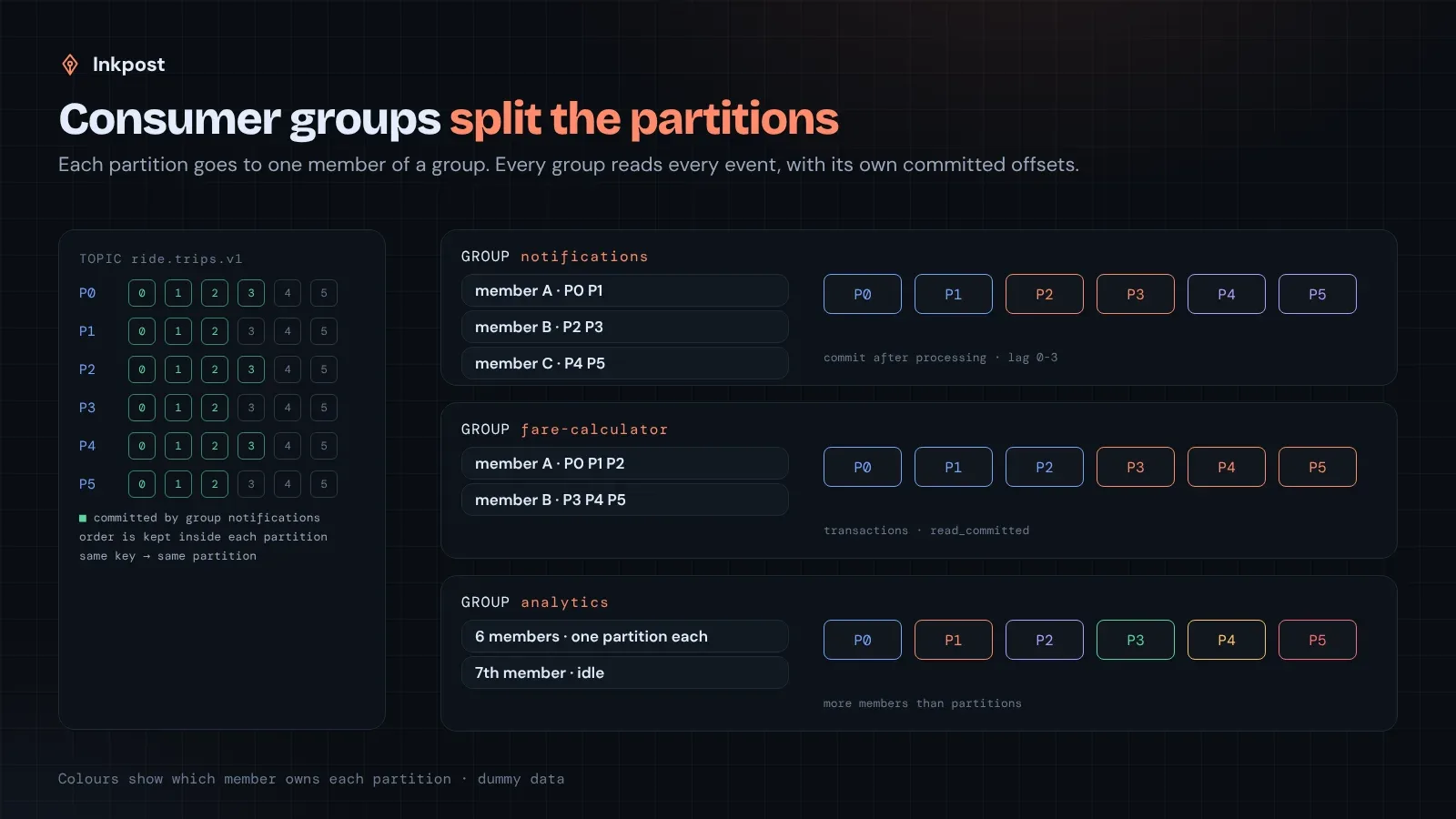
More members than partitions means the extras sit idle. Partition count is your ceiling on parallelism, which is another reason to choose it generously.
Each group stores its position per partition as a committed offset, in an internal compacted topic called
__consumer_offsets.A brand-new group starts at the end of the log by default (
auto.offset.reset=latest). SetfromBeginning: true(earliest) to process history.
Offsets and commits
A committed offset means: this group has finished everything before this position. It's the offset of the next record to read, which is why our code commits offset + 1. When a consumer restarts or a partition moves, reading resumes from the committed offset. When you commit therefore decides what happens after a crash.
Commit strategy | What happens if the process crashes | Result |
|---|---|---|
Commit before processing | Records after the commit were never processed | At-most-once: possible loss |
Auto-commit every 5 s (the default) | Up to 5 s of records are re-read; occasionally records are committed before your async work finished | Usually at-least-once, but fuzzy |
Commit after processing (manual) | The last uncommitted records are processed again | At-least-once: possible duplicates, no loss |
Commit inside a Kafka transaction with the output | Output and offset are saved together or not at all | Exactly-once within Kafka |
At-least-once is the sensible default for most services, and it has one consequence you can't skip: your handler will sometimes see the same event twice, so it must be idempotent. Processing an event twice should have the same effect as processing it once.
The notification consumer
Business logic first, kept free of Kafka so it's easy to test. It de-duplicates by event id, sorts errors into permanent (bad data, retrying won't help) and transient (a timeout, retrying later might), and sends a push notification when a driver accepts a trip:
// src/consumer/handle-trip.ts - business logic, kept free of Kafka code so it is easy to testimport type { TripEvent } from '../types.js';export class PermanentError extends Error {} // retrying will never help (bad data)export class TransientError extends Error {} // retrying later may help (timeout, 503)// In production this is a table with a UNIQUE(event_id) constraint, not memoryconst processed = new Set<string>();export async function handleTrip(event: TripEvent, eventId: string): Promise<'done' | 'duplicate'> { if (processed.has(eventId)) return 'duplicate'; // idempotent consumer: same event twice = no effect if (event.type === 'TripEnded' && event.distanceKm < 0) { throw new PermanentError(`negative distance for ${event.tripId}`); } if (event.type === 'TripAccepted') { await sendPush(event.tripId, `Your driver arrives in ${event.etaMinutes} min`); } processed.add(eventId); return 'done';}let flaky = Number(process.env.FLAKY_PUSHES ?? 0); // lets the demo simulate an outageasync function sendPush(tripId: string, text: string) { if (flaky > 0) { flaky--; throw new TransientError('push provider returned 503'); } console.log(`push -> ${tripId}: ${text}`);}Then the Kafka side. Auto-commit is off, and we commit after each record is handled or parked:
// src/consumer/trip-consumer.ts - notification service: one member of the "notifications" groupimport { kafka, onShutdown, TOPICS } from '../kafka.js';import type { TripEvent } from '../types.js';import { handleTrip, PermanentError } from './handle-trip.js';import { sendToRetryOrDlq } from './retry.js';export const consumer = kafka.consumer({ kafkaJS: { groupId: 'notifications', fromBeginning: true, // a brand-new group starts at the oldest retained event autoCommit: false, // we commit ourselves, only after the work is done }, 'group.protocol': process.env.GROUP_PROTOCOL === 'classic' ? 'classic' : 'consumer', // KIP-848 (Kafka 4.0+)});export async function startTripConsumer() { await consumer.connect(); await consumer.subscribe({ topics: [TOPICS.trips] }); await consumer.run({ partitionsConsumedConcurrently: 3, // partitions run in parallel; order inside each is kept eachMessage: async ({ topic, partition, message }) => { // Producers stamp every event with a unique id; it is our de-duplication key const eventId = message.headers?.['event-id']?.toString() ?? `${topic}-${partition}-${message.offset}`; const event = JSON.parse(message.value!.toString()) as TripEvent; try { const result = await handleTrip(event, eventId); console.log(`[p${partition} @${message.offset}] ${event.type} ${event.tripId} ${result}`); } catch (err) { // Never block the partition on one bad event: park it and keep going await sendToRetryOrDlq(message, err as Error, { permanent: err instanceof PermanentError }); } // Commit the NEXT offset to read. Kafka offsets are "where to resume", not "what I read". await consumer.commitOffsets([{ topic, partition, offset: (BigInt(message.offset) + 1n).toString() }]); }, });}if (import.meta.url === `file://${process.argv[1]}`) { onShutdown(() => consumer.disconnect()); // leaves the group so partitions move at once await startTripConsumer();}partitionsConsumedConcurrently: 3processes up to three partitions in parallel while keeping order inside each. It's the easiest throughput win in a Node consumer, because most handlers wait on I/O.A failing event never blocks its partition: it goes to a retry topic and we move on. Without that, one bad record stops every event behind it, a situation known as a poison pill.
In production, the
processedset in the handler is a database table with a unique constraint onevent_id, written in the same database transaction as the business change. That makes the handler idempotent across restarts.
Heartbeats, poll intervals and slow handlers
The group coordinator, a role played by one broker, needs to know each member is alive. Two separate timers matter. Heartbeats prove the process is alive; if none arrive within the session timeout (45 s by default), the member is removed. And max.poll.interval.ms (5 minutes by default) proves the member is making progress; if your code doesn't come back for more records within it, the client leaves the group and its partitions are reassigned, even though the process is alive. A handler that sometimes takes minutes, such as calling a slow partner API, needs either a higher limit, smaller batches or the pause-and-resume approach used by the retry worker below.
Rebalancing: classic, cooperative and the new protocol
A rebalance is how a group redistributes partitions when members join, leave or crash, or when partitions are added. How it happens has changed a lot, and it's one of the biggest practical differences between older and current Kafka.
Protocol | How it works | Impact on your app |
|---|---|---|
Classic, eager (range, round-robin) | Every member gives up all partitions, the group leader computes a new assignment, everyone gets new partitions | A stop-the-world pause for the whole group on every change |
Classic, cooperative-sticky | Members only give up partitions that actually move, over two short rounds | Most partitions keep flowing; much smaller pauses |
Consumer protocol (KIP-848), GA in Kafka 4.0 | The broker computes assignments and hands them out incrementally through heartbeats; no group-wide synchronisation barrier | Faster, smoother rebalances; a slow member no longer holds up the others; the broker owns the timeouts and assignor |
To use the new protocol you need Kafka 4.0+ brokers and a client that supports it. In the Confluent client it's one property, 'group.protocol': 'consumer', which our trip consumer sets. With it, assignment strategy and session timeout are configured on the broker side, so don't set partition.assignment.strategy or session.timeout.ms in the client. Kafka 4.3 already logs a warning recommending the new protocol, so treat the classic one as legacy for new services. KafkaJS doesn't support KIP-848; @platformatic/kafka does (groupProtocol: 'consumer').
You can see the difference in the client logs. Simplified, a rebalance on the classic eager protocol looks like this for every member of the group, even ones whose partitions didn't need to move:
[notifications] member A: revoking partitions [0,1,2]
[notifications] member B: revoking partitions [3,4,5]
...group pauses while the leader computes a new assignment...
[notifications] member A: assigned [0,1]
[notifications] member B: assigned [2,3]
[notifications] member C: assigned [4,5]
With cooperative or KIP-848 rebalancing, member A only gives up partition 2 and member B only partitions 4 and 5; partitions 0, 1 and 3 keep processing throughout.
Inspect and reset groups from the command line
# Every group, its members, and how far behind each partition isdocker compose exec kafka-1 /opt/kafka/bin/kafka-consumer-groups.sh \ --bootstrap-server kafka-1:19092 --describe --group notifications# GROUP TOPIC PARTITION CURRENT-OFFSET LOG-END-OFFSET LAG CONSUMER-ID ...# notifications ride.trips.v1 0 4 4 0 rdkafka-...# notifications ride.trips.v1 1 8 11 3 rdkafka-...# Replay: move the group back one hour (the group must have no active members)docker compose exec kafka-1 /opt/kafka/bin/kafka-consumer-groups.sh \ --bootstrap-server kafka-1:19092 --group notifications --topic ride.trips.v1 \ --reset-offsets --by-duration PT1H --executeDelivery semantics and exactly-once
Every messaging system has to answer one question: if something fails halfway, does the message get lost, processed twice, or neither? Kafka's answer depends on how you use it.
Guarantee | How you get it | Cost |
|---|---|---|
At-most-once | Commit before processing, or acks=0 | Lost messages on failure |
At-least-once | acks=all + idempotent producer + commit after processing | Duplicates on failure; handlers must be idempotent |
Exactly-once (within Kafka) | Transactions: consume, produce and commit offsets atomically; readers use read_committed | More latency and complexity; only covers Kafka-to-Kafka work |
The idempotent producer
Idempotence solves duplicates on the write path. Each producer gets an id, and each batch it sends to a partition carries a sequence number. If a network glitch makes the producer resend a batch the broker already wrote, the broker sees the repeated sequence number and ignores it. You get it by setting idempotent: true with acks: -1. It's on by default in the Java client but not in librdkafka, which is why every producer in this guide sets it.
Transactions: consume, transform, produce, exactly once
The fare calculator reads TripEnded events and writes FareCalculated events. Without transactions, a crash between writing a fare and committing the input offset means the trip is read again and charged twice. A Kafka transaction makes three things atomic: the output records, and the consumer's input offsets. They all become visible together, or none of them do.
// src/eos/fare-calculator.ts - read TripEnded, write FareCalculated, exactly once inside Kafkaimport { kafka, onShutdown, TOPICS } from '../kafka.js';import type { FareCalculated, TripEvent } from '../types.js';const BASE = 40, PER_KM = 12, PER_MIN = 1.5, COMMISSION = 0.2;export function fareFor(e: Extract<TripEvent, { type: 'TripEnded' }>): FareCalculated { const amount = Math.round((BASE + PER_KM * e.distanceKm + PER_MIN * e.durationMin) * 100) / 100; const commission = Math.round(amount * COMMISSION * 100) / 100; return { tripId: e.tripId, amount, currency: 'INR', commission, driverPayout: Math.round((amount - commission) * 100) / 100, calculatedAt: new Date().toISOString(), };}const consumer = kafka.consumer({ kafkaJS: { groupId: 'fare-calculator', fromBeginning: true, autoCommit: false }, 'isolation.level': 'read_committed', // never read output of aborted transactions});// transactionalId must be stable per instance (e.g. the pod name), unique across instancesconst producer = kafka.producer({ kafkaJS: { transactionalId: `fare-calculator-${process.env.HOSTNAME ?? 'local'}`, maxInFlightRequests: 1 },});export async function startFareCalculator(onFare?: (f: FareCalculated) => void) { await Promise.all([consumer.connect(), producer.connect()]); await consumer.subscribe({ topics: [TOPICS.trips] }); await consumer.run({ eachMessage: async ({ topic, partition, message }) => { const event = JSON.parse(message.value!.toString()) as TripEvent; const next = (BigInt(message.offset) + 1n).toString(); const txn = await producer.transaction(); try { if (event.type === 'TripEnded') { const fare = fareFor(event); await txn.send({ topic: TOPICS.fares, messages: [{ key: fare.tripId, value: JSON.stringify(fare) }] }); onFare?.(fare); } // The consumer's progress is committed in the SAME transaction as the output await txn.sendOffsets({ consumer, topics: [{ topic, partitions: [{ partition, offset: next }] }] }); await txn.commit(); // output + offset become visible together, or not at all } catch (err) { await txn.abort(); // nothing is visible; the message is read again throw err; } }, });}let stopped = false;export async function stopFareCalculator() { if (stopped) return; stopped = true; await consumer.disconnect(); await producer.disconnect();}if (import.meta.url === `file://${process.argv[1]}`) { onShutdown(stopFareCalculator); await startFareCalculator((f) => console.log(`fare ${f.tripId}: ₹${f.amount} (driver ₹${f.driverPayout})`));}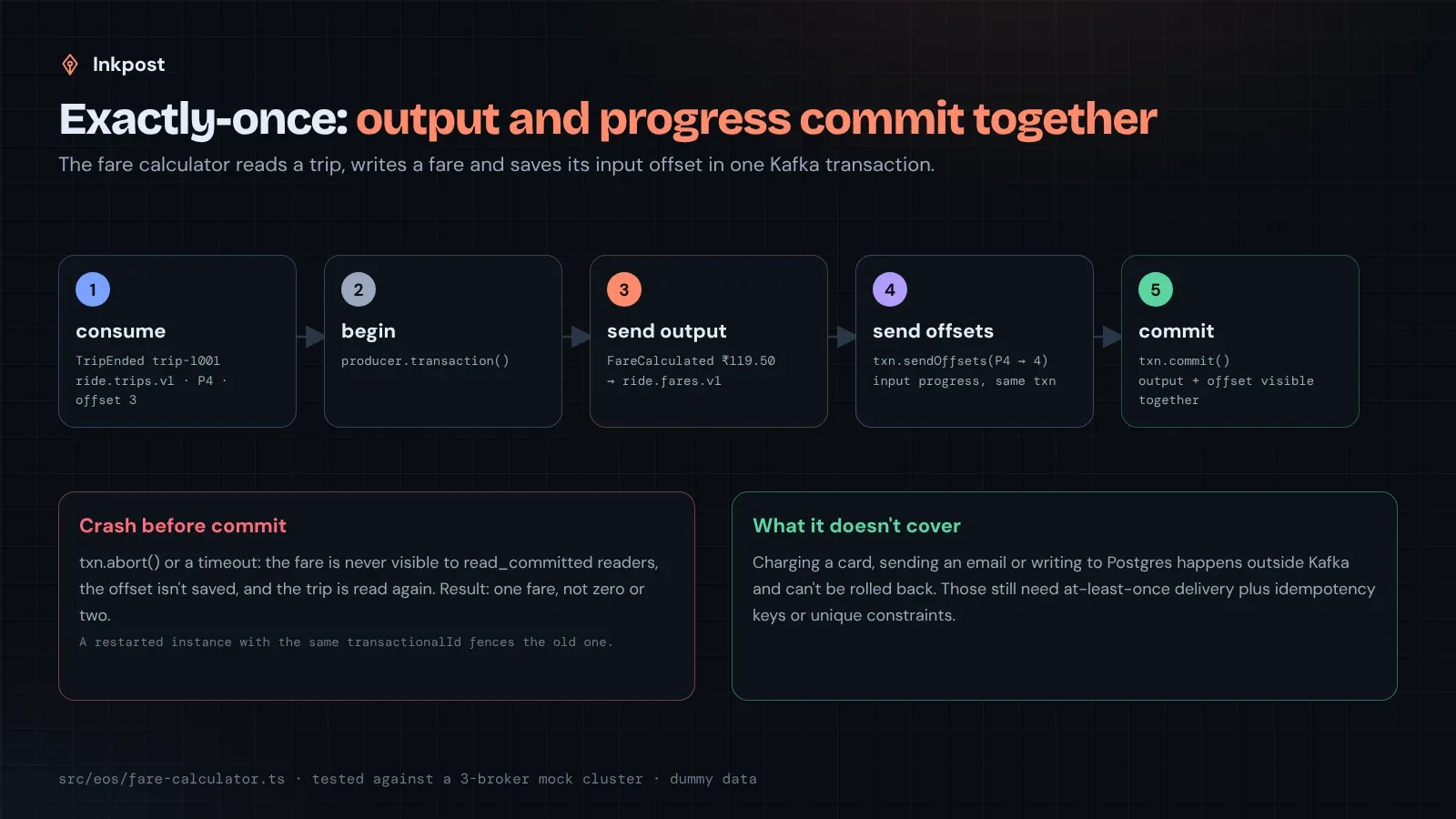
transactionalIdmust be stable for an instance and unique across instances. When an instance restarts with the same id, Kafka fences off the old one: any zombie copy still running can no longer commit, which prevents two instances writing the same output.txn.sendOffsets()puts the input offset in the transaction, so the input is marked done only if the output is committed.Downstream readers must use
isolation.level=read_committedto skip records from aborted transactions. librdkafka-based consumers already default to it; Java consumers don't.One transaction per record keeps the example simple. In production, use
eachBatchand one transaction per batch: transaction overhead is per commit, not per record.
Retries and dead-letter topics
Errors come in two kinds, and they need different handling. Transient errors, like a 503 from the push provider, may succeed later, so retry them with growing delays. Permanent errors, like an event with a negative distance, will never succeed, so park them for a person to look at. Retrying in place blocks the partition, so we send failures to a separate retry topic, and after too many attempts, or immediately for permanent errors, to a dead-letter topic (DLQ).
// src/consumer/retry.ts - retry topic with back-off, then a dead-letter topicimport { KafkaJS } from '@confluentinc/kafka-javascript';import { kafka, onShutdown, TOPICS } from '../kafka.js';import type { TripEvent } from '../types.js';import { handleTrip, PermanentError } from './handle-trip.js';type KafkaMessage = KafkaJS.KafkaMessage;const MAX_ATTEMPTS = 5;const BACKOFF_MS = [1_000, 5_000, 30_000, 120_000, 600_000];export const dlqProducer = kafka.producer({ kafkaJS: { idempotent: true, acks: -1 } });let connected: Promise<void> | undefined;const header = (m: KafkaMessage, name: string) => m.headers?.[name]?.toString();/** Move a failed message to the retry topic, or to the DLQ when it is hopeless or out of attempts. */export async function sendToRetryOrDlq(message: KafkaMessage, err: Error, opts: { permanent: boolean }) { connected ??= dlqProducer.connect(); await connected; const attempt = Number(header(message, 'x-attempt') ?? 0) + 1; const toDlq = opts.permanent || attempt > MAX_ATTEMPTS; const delay = BACKOFF_MS[Math.min(attempt - 1, BACKOFF_MS.length - 1)]; await dlqProducer.send({ topic: toDlq ? TOPICS.tripsDlq : TOPICS.tripsRetry, messages: [ { key: message.key, // keep the key so ordering per trip survives the detour value: message.value, headers: { ...message.headers, 'x-attempt': String(attempt), 'x-retry-at': String(Date.now() + delay), 'x-error': err.message.slice(0, 500), 'x-original-offset': message.offset, }, }, ], }); console.warn(`${toDlq ? 'DLQ' : `retry #${attempt} in ${delay} ms`}: ${err.message}`);}/** Worker that re-processes the retry topic once each message's back-off has passed. */export async function startRetryWorker() { const consumer = kafka.consumer({ kafkaJS: { groupId: 'notifications-retry', fromBeginning: true } }); await consumer.connect(); await consumer.subscribe({ topics: [TOPICS.tripsRetry] }); onShutdown(() => consumer.disconnect()); await consumer.run({ eachMessage: async ({ message, pause }) => { const waitMs = Number(header(message, 'x-retry-at')) - Date.now(); if (waitMs > 0) { // Not due yet: pause this partition, resume later, and re-read the same message then const resume = pause(); setTimeout(resume, waitMs); throw new Error('not due yet'); // makes the client re-deliver this offset after resume } const event = JSON.parse(message.value!.toString()) as TripEvent; try { await handleTrip(event, header(message, 'event-id') ?? message.offset); } catch (err) { await sendToRetryOrDlq(message, err as Error, { permanent: err instanceof PermanentError }); } }, });}The key is kept, so the retry and DLQ topics have the same per-trip ordering as the original.
Headers carry the attempt count, when to retry next, the error and the original offset, which is everything a person needs to investigate and replay.
The retry worker doesn't sleep inside the handler (that would trip
max.poll.interval.ms). It pauses the partition, schedules a resume, and throws so the client re-delivers the same record after the resume. We checked this: a record scheduled 4 s out was processed 4.28 s later.Since the retry topic holds records in arrival order with growing delays, one far-future record can delay younger ones behind it. Larger systems use several retry topics with fixed delays (1 minute, 10 minutes, 1 hour) so each topic's records are due in order.
Replaying a DLQ is just producing its records back to the main topic once the bug is fixed. The event id header makes the replay safe, because the handler skips anything already processed.
Schemas and the Schema Registry
Kafka stores bytes and checks nothing. If the fare service renames amount to total, every consumer breaks at runtime, maybe days later when an old event is replayed. A schema registry turns the event format into an enforced contract: producers can only write data that matches a registered schema, and a new version is only accepted if it's compatible with the old ones.
Format | Pros | Cons |
|---|---|---|
JSON (no schema) | Readable, no setup | No enforcement; field names repeated in every message |
JSON Schema | Still JSON; validation | Larger messages; evolution rules are trickier |
Avro | Compact binary; strong evolution rules; the Kafka world's most common choice | Needs the schema to read; less readable when debugging |
Protobuf | Compact; great tooling across languages | Evolution rules differ slightly; code generation step |
The registry assigns each schema an id. A serialised message starts with a magic byte (0), then the 4-byte schema id, then the binary data, so a reader can fetch the exact schema the writer used. Schemas are grouped into subjects; with the default naming strategy, the subject for our topic's values is ride.fares.v1-value.
Compatibility mode | A new schema must let... | Safe changes |
|---|---|---|
BACKWARD (default) | New readers read data written with the previous schema | Delete fields; add fields with defaults. Upgrade consumers first. |
FORWARD | Old readers read data written with the new schema | Add fields; delete fields that had defaults. Upgrade producers first. |
FULL | Both directions | Only add or remove fields that have defaults |
*_TRANSITIVE variants | The same, checked against all previous versions, not just the last | Safer for long-retained topics |
NONE | Anything | Nothing is checked; avoid |
// src/schema/fare-schema.ts - Avro contract for FareCalculated, enforced by a Schema Registryimport { AvroDeserializer, AvroSerializer, Compatibility, SchemaRegistryClient, SerdeType, type Client,} from '@confluentinc/schemaregistry';import { TOPICS } from '../kafka.js';import type { FareCalculated } from '../types.js';export const fareSchemaV1 = { type: 'record', name: 'FareCalculated', namespace: 'com.example.rides', fields: [ { name: 'tripId', type: 'string' }, { name: 'amount', type: 'double' }, { name: 'currency', type: { type: 'enum', name: 'Currency', symbols: ['INR'] } }, { name: 'commission', type: 'double' }, { name: 'driverPayout', type: 'double' }, { name: 'calculatedAt', type: 'string' }, // v2 adds an optional field WITH a default: old readers ignore it, new readers fill it in // { name: 'surgeMultiplier', type: 'double', default: 1.0 }, ],};export const SUBJECT = `${TOPICS.fares}-value`; // TopicNameStrategy: <topic>-valueexport function registryClient(): Client { return new SchemaRegistryClient({ baseURLs: [process.env.SCHEMA_REGISTRY_URL ?? 'http://localhost:8081'], });}/** Run once from CI/CD, not on every app start: register the schema and lock its evolution rule. */export async function registerFareSchema(client: Client) { await client.updateConfig(SUBJECT, { compatibility: Compatibility.BACKWARD }); return client.register(SUBJECT, { schemaType: 'AVRO', schema: JSON.stringify(fareSchemaV1) }, false);}export function fareSerde(client: Client) { // Apps only USE registered schemas; they cannot register a breaking change by accident const serializer = new AvroSerializer(client, SerdeType.VALUE, { autoRegisterSchemas: false, useLatestVersion: true }); const deserializer = new AvroDeserializer(client, SerdeType.VALUE, {}); return { encode: (fare: FareCalculated) => serializer.serialize(TOPICS.fares, fare), decode: async (bytes: Buffer) => (await deserializer.deserialize(TOPICS.fares, bytes)) as FareCalculated, };}Two choices here matter in production. Schemas are registered by the deployment pipeline, not by the app at runtime (autoRegisterSchemas: false), so a developer can't publish a breaking change by accident. And the subject is locked to BACKWARD compatibility, so the registry rejects a version that would break existing readers. Our test serialises a fare and checks the wire format: magic byte 0, and smaller than the same object as JSON.
Registry | Licence | Notes |
|---|---|---|
Confluent Schema Registry (cp-schema-registry 8.4.1) | Confluent Community License (source-available) | The reference implementation; free to self-host, but not OSI open source |
Apicurio Registry 3.3.5 | Apache 2.0 | Red Hat-led; also stores OpenAPI and AsyncAPI; offers a Confluent-compatible API |
Karapace 6.2.4 | Apache 2.0 | Aiven's drop-in replacement for the Confluent Schema Registry API |
Watching consumer lag
Lag is the number of records written to a partition that a group hasn't processed yet: the log-end offset minus the committed offset. It's the most important health signal in a Kafka system. Steady small lag is normal. Lag that keeps growing means consumers can't keep up, and alerts should fire on that trend, not on a single number.
// src/ops/lag.ts - how far behind is each consumer group? (the #1 Kafka health metric)import { kafka } from '../kafka.js';export async function consumerLag(groupId: string, topic: string) { const admin = kafka.admin(); await admin.connect(); try { const [committed] = await admin.fetchOffsets({ groupId, topics: [topic] }); const ends = await admin.fetchTopicOffsets(topic); return ends.map(({ partition, high }) => { const c = committed?.partitions.find((p) => p.partition === partition)?.offset ?? '-1'; const lag = c === '-1' ? BigInt(high) : BigInt(high) - BigInt(c); // -1 = nothing committed yet return { partition, committed: c, logEnd: high, lag: Number(lag) }; }); } finally { await admin.disconnect(); }}if (import.meta.url === `file://${process.argv[1]}`) { const [groupId = 'notifications', topic = 'ride.trips.v1'] = process.argv.slice(2); const rows = await consumerLag(groupId, topic); console.table(rows); console.log(`total lag for ${groupId} on ${topic}: ${rows.reduce((s, r) => s + r.lag, 0)}`);}In production you'd export lag as a metric rather than run a script: a lag exporter, your managed service's built-in metrics or the client's own statistics feed it into a system such as Prometheus and Grafana. Alert when lag grows for several minutes, and look at it together with consumer error rates and rebalance counts.
Testing Kafka code
Keep business logic out of Kafka callbacks, as handleTrip and fareFor are, and most of your tests need no Kafka at all. For the Kafka wiring, there are two good options in Node.
An in-process mock cluster
librdkafka includes a mock cluster for testing: a set of fake brokers inside your process that speak the real Kafka protocol. It starts in milliseconds and needs no Docker. A small helper starts one and finds its ports:
// test/mock-cluster.ts - a 3-broker fake cluster inside the test process, via librdkafka's test featureimport { readFileSync } from 'node:fs';import { KafkaJS } from '@confluentinc/kafka-javascript';function listeningPorts(): Set<number> { const ports = new Set<number>(); for (const file of ['/proc/self/net/tcp', '/proc/self/net/tcp6']) { try { for (const line of readFileSync(file, 'utf8').split('\n').slice(1)) { const cols = line.trim().split(/\s+/); if (cols[3] === '0A') ports.add(parseInt(cols[1].split(':')[1], 16)); // 0A = LISTEN } } catch { /* not Linux */ } } return ports;}/** Starts librdkafka's mock brokers and returns their addresses. Linux only; not a real Kafka. */export async function startMockCluster(brokers = 3) { const before = listeningPorts(); // 'test.mock.num.brokers' is a librdkafka testing property, so it is not in the typed config const config = { kafkaJS: { brokers: ['mock:9092'] }, 'test.mock.num.brokers': brokers } as KafkaJS.CommonConstructorConfig; const holder = new KafkaJS.Kafka(config).producer(); await holder.connect(); // the mock cluster lives as long as this client const addresses = [...listeningPorts()].filter((p) => !before.has(p)).map((p) => `127.0.0.1:${p}`); return { addresses, stop: () => holder.disconnect() };}The suite then runs the real code against it: keys and partitions, idempotency, the full transactional fare-calculator flow with a read_committed reader, a poison event flowing to the DLQ, and Avro with a mock registry. To prove the transaction committed its input offsets, it stops the calculator and starts a new member of the same group: if the offsets were saved, the new member has nothing to re-read.
// test/pipeline.test.ts - producer -> transactional fare calculator -> consumerimport assert from 'node:assert/strict';import { after, before, test } from 'node:test';import { MockClient } from '@confluentinc/schemaregistry';import { startMockCluster } from './mock-cluster.js';const cluster = await startMockCluster(3);process.env.KAFKA_BROKERS = cluster.addresses.join(','); // must be set before importing src/kafka.tsprocess.env.GROUP_PROTOCOL = process.env.GROUP_PROTOCOL ?? 'classic';const { kafka, TOPICS } = await import('../src/kafka.js');const { tripProducer, publishTrip } = await import('../src/producer/trip-producer.js');const { startFareCalculator, stopFareCalculator, fareFor } = await import('../src/eos/fare-calculator.js');const { handleTrip } = await import('../src/consumer/handle-trip.js');const { consumer: tripConsumer, startTripConsumer } = await import('../src/consumer/trip-consumer.js');const { dlqProducer } = await import('../src/consumer/retry.js');const { fareSchemaV1, fareSerde, SUBJECT } = await import('../src/schema/fare-schema.js');before(() => tripProducer.connect());after(async () => { await tripProducer.disconnect(); await stopFareCalculator(); await cluster.stop();});test('fare maths', () => { const f = fareFor({ type: 'TripEnded', tripId: 't', driverId: 'd', distanceKm: 5, durationMin: 13, at: '' }); assert.deepEqual([f.amount, f.commission, f.driverPayout], [119.5, 23.9, 95.6]);});test('same key always lands on the same partition', async () => { const parts = new Set<number>(); for (let i = 0; i < 4; i++) { const m = await publishTrip({ type: 'TripStarted', tripId: 'trip-key-check', driverId: 'drv-1', at: '' }); parts.add(m.partition); } assert.equal(parts.size, 1);});test('idempotent consumer ignores a redelivered event', async () => { const e = { type: 'TripStarted', tripId: 'trip-dup', driverId: 'drv-9', at: '' } as const; assert.equal(await handleTrip(e, 'evt-1'), 'done'); assert.equal(await handleTrip(e, 'evt-1'), 'duplicate');});test('TripEnded events produce fares through a transaction', async () => { const fares: string[] = []; await startFareCalculator((f) => fares.push(f.tripId)); for (let i = 1; i <= 3; i++) { await publishTrip({ type: 'TripEnded', tripId: `trip-eos-${i}`, driverId: `drv-${i}`, distanceKm: i, durationMin: 10, at: '' }); } for (let t = 0; t < 60 && fares.length < 3; t++) await new Promise((r) => setTimeout(r, 500)); assert.deepEqual(fares.sort(), ['trip-eos-1', 'trip-eos-2', 'trip-eos-3']); // Read the output topic as a read_committed consumer: all three fares are visible const seen = new Set<string>(); const reader = kafka.consumer({ kafkaJS: { groupId: 'test-reader', fromBeginning: true } }); await reader.connect(); await reader.subscribe({ topics: [TOPICS.fares] }); await reader.run({ eachMessage: async ({ message }) => { seen.add(message.key!.toString()); } }); for (let t = 0; t < 60 && seen.size < 3; t++) await new Promise((r) => setTimeout(r, 500)); await reader.disconnect(); assert.equal(seen.size, 3); // The calculator committed its input offsets inside the same transactions. Stop it, then join // the same group again: a member that resumes from the committed offsets has nothing to re-read. await stopFareCalculator(); let replayed = 0; const again = kafka.consumer({ kafkaJS: { groupId: 'fare-calculator', fromBeginning: true } }); await again.connect(); await again.subscribe({ topics: [TOPICS.trips] }); await again.run({ eachMessage: async () => { replayed++; } }); await new Promise((r) => setTimeout(r, 8000)); await again.disconnect(); assert.equal(replayed, 0);});test('a poison event goes to the DLQ with its error, and the partition keeps moving', async () => { await startTripConsumer(); await publishTrip({ type: 'TripEnded', tripId: 'trip-bad', driverId: 'drv-9', distanceKm: -3, durationMin: 5, at: '' }); await publishTrip({ type: 'TripStarted', tripId: 'trip-bad', driverId: 'drv-9', at: '' }); const dlq: { key: string; error: string; attempt: string }[] = []; // The DLQ topic may not exist yet when we subscribe, so refresh metadata often const watcher = kafka.consumer({ kafkaJS: { groupId: 'test-dlq', fromBeginning: true }, 'topic.metadata.refresh.interval.ms': 1000 }); await watcher.connect(); await watcher.subscribe({ topics: [TOPICS.tripsDlq] }); await watcher.run({ eachMessage: async ({ message }) => { dlq.push({ key: message.key!.toString(), error: String(message.headers?.['x-error']), attempt: String(message.headers?.['x-attempt']) }); }, }); for (let t = 0; t < 60 && dlq.length < 1; t++) await new Promise((r) => setTimeout(r, 500)); await watcher.disconnect(); await tripConsumer.disconnect(); await dlqProducer.disconnect(); assert.equal(dlq.length, 1); assert.equal(dlq[0].key, 'trip-bad'); // same key, so a replay lands in the same order assert.match(dlq[0].error, /distance/i);});test('Avro serde round-trips through a (mock) Schema Registry', async () => { const registry = new MockClient(); await registry.register(SUBJECT, { schemaType: 'AVRO', schema: JSON.stringify(fareSchemaV1) }); const { encode, decode } = fareSerde(registry); const fare = { tripId: 't-1', amount: 119.5, currency: 'INR' as const, commission: 23.9, driverPayout: 95.6, calculatedAt: '2026-11-27T10:00:00Z' }; const bytes = await encode(fare); assert.equal(bytes[0], 0); // magic byte, then a 4-byte schema id, then Avro binary assert.ok(bytes.length < JSON.stringify(fare).length); // Avro is smaller than JSON assert.deepEqual({ ...(await decode(bytes)) }, fare); // spread: Avro returns a typed record object});npm run typecheck # tsc --noEmit: no errorsnpm test # 6 tests against librdkafka's in-process mock cluster# ok 1 - fare maths# ok 2 - same key always lands on the same partition# ok 3 - idempotent consumer ignores a redelivered event# ok 4 - TripEnded events produce fares through a transaction# ok 5 - a poison event goes to the DLQ with its error, and the partition keeps moving# ok 6 - Avro serde round-trips through a (mock) Schema Registry# pass 6, fail 0GROUP_PROTOCOL=consumer npm test # same suite with the KIP-848 group protocol: pass 6npm run test:containers # optional: real broker in Docker via TestcontainersA real broker with Testcontainers
For integration tests, Testcontainers starts a real Kafka in Docker for the duration of the test and removes it afterwards. Confluent Platform images from 8.0 run in KRaft mode by default, so one container is enough:
// test/integration.containers.test.ts - the same pipeline against a real broker in Docker.// Opt-in because it pulls an image: RUN_CONTAINERS=1 npm run test:containersimport assert from 'node:assert/strict';import { after, before, test } from 'node:test';import { KafkaContainer, type StartedKafkaContainer } from '@testcontainers/kafka';const enabled = process.env.RUN_CONTAINERS === '1';let container: StartedKafkaContainer;// Confluent Platform 8.x images run in KRaft mode by default (no ZooKeeper container needed)before(async () => { if (!enabled) return; container = await new KafkaContainer('confluentinc/cp-kafka:8.4.1').start(); process.env.KAFKA_BROKERS = `${container.getHost()}:${container.getMappedPort(9093)}`;});after(async () => { if (enabled) await container.stop();});test('real broker: transactional fares commit their input offsets (lag = 0)', { skip: !enabled }, async () => { const { kafka, TOPICS } = await import('../src/kafka.js'); const { tripProducer, publishTrip } = await import('../src/producer/trip-producer.js'); const { startFareCalculator, stopFareCalculator } = await import('../src/eos/fare-calculator.js'); const { consumerLag } = await import('../src/ops/lag.js'); // One broker, so replication factor 1 here (production topics use 3, see src/admin/create-topics.ts) const admin = kafka.admin(); await admin.connect(); await admin.createTopics({ topics: [TOPICS.trips, TOPICS.fares].map((topic) => ({ topic, numPartitions: 3, replicationFactor: 1 })), }); await admin.disconnect(); const fares: string[] = []; await tripProducer.connect(); await startFareCalculator((f) => fares.push(f.tripId)); for (let i = 1; i <= 5; i++) { await publishTrip({ type: 'TripEnded', tripId: `trip-${i}`, driverId: `drv-${i}`, distanceKm: i, durationMin: 12, at: new Date().toISOString() }); } for (let t = 0; t < 60 && fares.length < 5; t++) await new Promise((r) => setTimeout(r, 500)); assert.equal(fares.length, 5); await new Promise((r) => setTimeout(r, 1000)); const lag = await consumerLag('fare-calculator', TOPICS.trips); assert.equal(lag.reduce((sum, p) => sum + p.lag, 0), 0); await stopFareCalculator(); await tripProducer.disconnect();});Part 4: Patterns for real systems
The dual-write problem and the transactional outbox
Here is a bug that hides in almost every first event-driven service. The trip service ends a trip by updating its Postgres table and then producing TripEnded to Kafka. Two writes, two systems, no shared transaction. If the process crashes between them, the database says the trip ended but no event was ever sent: the driver is never paid. Flip the order and you can send an event for a trip that was never saved. Retries don't fix it; they only move the gap.
The transactional outbox pattern removes the second write. The service writes the business change and the event into its own database, in one local transaction. A separate process, here Debezium, reads new outbox rows from the database's change log and publishes them to Kafka. Both rows commit or neither does, and publishing happens reliably afterwards.
-- src/outbox/outbox.sql - the transactional outbox table (Debezium's default column names)CREATE TABLE outbox ( id uuid PRIMARY KEY, aggregatetype varchar(255) NOT NULL, -- becomes part of the topic name, e.g. "trips" aggregateid varchar(255) NOT NULL, -- becomes the Kafka message key, e.g. the trip id type varchar(255) NOT NULL, -- event type, e.g. "TripEnded" payload jsonb NOT NULL, created_at timestamptz NOT NULL DEFAULT now());// src/outbox/end-trip.ts - change the database AND record the event in ONE local transactionimport { randomUUID } from 'node:crypto';import pg from 'pg';const pool = new pg.Pool({ connectionString: process.env.DATABASE_URL ?? 'postgres://app:app@localhost:5432/rides' });export async function endTrip(tripId: string, driverId: string, distanceKm: number, durationMin: number) { const client = await pool.connect(); try { await client.query('BEGIN'); await client.query( `UPDATE trips SET status = 'ENDED', distance_km = $2, duration_min = $3, ended_at = now() WHERE id = $1`, [tripId, distanceKm, durationMin], ); // No Kafka call here. Debezium reads this row from the WAL and publishes it for us. await client.query( `INSERT INTO outbox (id, aggregatetype, aggregateid, type, payload) VALUES ($1, 'trips', $2, 'TripEnded', $3)`, [randomUUID(), tripId, { type: 'TripEnded', tripId, driverId, distanceKm, durationMin, at: new Date().toISOString() }], ); await client.query('COMMIT'); // both rows, or neither: no "saved but never published" } catch (err) { await client.query('ROLLBACK'); throw err; } finally { client.release(); }}Debezium runs as a Kafka Connect connector. It reads Postgres's write-ahead log through logical replication (the built-in pgoutput plugin), so it adds no polling load and sees rows in commit order. Its outbox event router turns each outbox row into a clean Kafka record: aggregatetype picks the topic, aggregateid becomes the key, and extra columns can become headers:
{ "name": "rides-outbox", "config": { "connector.class": "io.debezium.connector.postgresql.PostgresConnector", "plugin.name": "pgoutput", "database.hostname": "postgres", "database.port": "5432", "database.user": "debezium", "database.password": "${file:/opt/secrets/db.properties:password}", "database.dbname": "rides", "topic.prefix": "rides", "table.include.list": "public.outbox", "tombstones.on.delete": "false", "transforms": "outbox", "transforms.outbox.type": "io.debezium.transforms.outbox.EventRouter", "transforms.outbox.route.topic.replacement": "ride.${routedByValue}.v1", "transforms.outbox.table.expand.json.payload": "true", "transforms.outbox.table.fields.additional.placement": "type:header:event-type,id:header:event-id", "value.converter": "org.apache.kafka.connect.json.JsonConverter", "value.converter.schemas.enable": "false" }}route.topic.replacementmaps aggregate typetripstoride.trips.v1. Debezium's default would beoutbox.event.trips.table.expand.json.payloadpublishes the JSONB payload as a JSON object instead of an escaped string.typeandidbecome theevent-typeandevent-idheaders, the same ones our Node producer sets, so consumers can't tell which path an event took.The database password comes from a file via a Kafka Connect config provider, never from the JSON itself.
Delivery is at-least-once (a connector restart can publish a row twice), so consumers still de-duplicate by
event-id. The outbox removes lost events; idempotent consumers remove duplicates.Delete old outbox rows on a schedule. Debezium has already read them from the log, so deleting them doesn't publish anything (
tombstones.on.deleteis off).
Change data capture beyond the outbox
The same Debezium connector can stream every insert, update and delete of chosen tables, not just an outbox. That's change data capture, and it's the usual way to keep a search index, cache or data warehouse in sync with an operational database without touching the application code. The trade-off: raw table changes expose your internal schema to every consumer, so for events between services, prefer an outbox with deliberately designed events, and use raw CDC for data pipelines.
Compacted topics as tables
A compacted topic keyed by driver id holds the latest status of every driver. A new service can build its own in-memory or Redis copy by reading the topic from the beginning, then stay current by reading new records. Kafka becomes the shared, replayable source of reference data, and no service needs to call another service's API to get it. Send a tombstone (the key with a null value) when a driver is deleted, so compaction removes them.
Event sourcing and CQRS
In event sourcing, the events are the source of truth: the current state of a payout is whatever you get by replaying its events in order. CQRS (command query responsibility segregation) pairs naturally with it: writes append events, and separate read models, built by consumers into databases suited to each query, serve reads. Kafka is a good transport and history for both. It's not a full event store on its own, because it can't efficiently load all events for one entity or enforce that a new event was based on the latest version, so most systems keep the authoritative events in a database and publish them through Kafka.
Request-reply, and why to avoid it
Sometimes a service needs an answer, such as a price quote. You can do request-reply over Kafka: send a request with a correlation id and a reply-to topic, and wait for the matching reply. NestJS even builds it in. But you've rebuilt a slower HTTP call with more moving parts. Use HTTP or gRPC for questions that need an immediate answer, and Kafka for facts that others react to.
NestJS and Kafka
If your services use NestJS, its microservices package has a Kafka transport. Controllers subscribe with decorators, and a client proxy emits events. Under the hood it uses KafkaJS, so the KafkaJS caveats apply, including no KIP-848 support.
// src/nest/rides.controller.ts - the same consumer, written the NestJS wayimport { Controller, Inject, Module, type OnModuleInit } from '@nestjs/common';import { ClientsModule, Ctx, EventPattern, KafkaContext, Payload, Transport, type ClientKafkaProxy,} from '@nestjs/microservices';import type { TripEvent } from '../types.js';@Controller()export class RidesController implements OnModuleInit { constructor(@Inject('RIDES_KAFKA') private readonly kafka: ClientKafkaProxy) {} async onModuleInit() { await this.kafka.connect(); } @EventPattern<string>('ride.trips.v1') // <string> picks the untyped overload so @Ctx() can be KafkaContext async onTrip(@Payload() event: TripEvent, @Ctx() ctx: KafkaContext) { const { offset } = ctx.getMessage(); console.log(`partition ${ctx.getPartition()} offset ${offset}: ${event.type} ${event.tripId}`); if (event.type === 'TripEnded') { // emit() publishes an event; send() would expect a reply on <topic>.reply this.kafka.emit('ride.receipts.v1', { key: event.tripId, value: { tripId: event.tripId } }); } }}@Module({ imports: [ ClientsModule.register([ { name: 'RIDES_KAFKA', transport: Transport.KAFKA, options: { client: { clientId: 'receipts', brokers: (process.env.KAFKA_BROKERS ?? 'localhost:29092').split(',') }, producer: { idempotent: true, maxInFlightRequests: 5 }, }, }, ]), ], controllers: [RidesController],})export class RidesModule {}// src/nest/main.ts - start a NestJS microservice that listens to Kafkaimport 'reflect-metadata';import { NestFactory } from '@nestjs/core';import { Transport, type MicroserviceOptions } from '@nestjs/microservices';import { RidesModule } from './rides.controller.js';const app = await NestFactory.createMicroservice<MicroserviceOptions>(RidesModule, { transport: Transport.KAFKA, options: { client: { clientId: 'receipts', brokers: (process.env.KAFKA_BROKERS ?? 'localhost:29092').split(',') }, consumer: { groupId: 'receipts' }, // Nest appends "-server" -> group "receipts-server" subscribe: { fromBeginning: true }, },});app.enableShutdownHooks();await app.listen();NestJS appends
-serverto the consumer group id and-clientto the client's, soreceiptsbecomesreceipts-server. Remember it when you look up lag.emit()publishes an event.send()is request-reply: it waits for an answer on a<topic>.replytopic, which must exist and be subscribed. Preferemit()for the reasons above.Since NestJS 12, patterns can also be regular expressions, so one handler can subscribe to a family of topics.
If you need the Confluent client's features inside Nest, a common approach is a small custom provider that wraps a
KafkaJS.Kafkainstance, like oursrc/kafka.ts, and is injected wherever needed.
Queues for Kafka: share groups
Consumer groups give each partition to one member, which preserves order but limits parallelism to the number of partitions and lets one slow record hold up its partition. That's wrong for job-style work, such as sending emails, where order doesn't matter and you'd like 50 workers on a 6-partition topic.
Share groups (KIP-932, Queues for Kafka) fill that gap. Members of a share group can read from the same partition at once. Each record is acquired by one member for a time-limited lock and acknowledged individually: accept when done, release to let someone else try, reject when it can never succeed, or renew to extend the lock for long-running work. Kafka counts delivery attempts, and since 4.4, records that exceed them can go to a dead-letter topic automatically. The feature was early access in 4.0, preview in 4.1, and production-ready in 4.2 (February 2026).
Consumer group | Share group | |
|---|---|---|
Partition ownership | One member per partition | Many members per partition |
Ordering | Kept per partition | Not guaranteed |
Parallelism limit | Number of partitions | Number of members |
Progress tracking | One committed offset per partition | Per-record acknowledgement and delivery count |
Good for | Event processing where order matters | Independent jobs: emails, image resizing, webhooks |
Stream processing
Stream processing means continuous computation over events as they arrive: counts per minute, joins between streams, detecting patterns. The fare calculator is a tiny example. For anything stateful, such as demand per city area over a sliding 5-minute window, you need state that survives restarts and rebalances, and that's what stream processing frameworks provide.
Option | Language | Where it runs | Notes |
|---|---|---|---|
Kafka Streams | Java/Kotlin library | Inside your own service | Part of Apache Kafka; state in local stores backed by compacted changelog topics; exactly-once built in |
Apache Flink | SQL, Java, Python | Its own cluster or a managed service | The industry's main stream processor; Flink 2.3 (June 2026) is current; managed by AWS, Confluent and others |
ksqlDB | SQL | Its own servers | Built on Kafka Streams; still works, but Confluent's strategic focus has moved to Flink |
Streaming databases (RisingWave, Materialize) | PostgreSQL-style SQL | Their own service | Keep query results up to date as events arrive; query them like a database |
Plain consumer + producer in Node | TypeScript | Your service | Fine for stateless transforms, filters and enrichment; you manage state yourself |
For a JavaScript team, a practical split is: stateless transforms and per-event business logic in Node, like everything in this guide, and windowed aggregations or stream joins in Flink SQL, which a JavaScript developer can write without learning Java. Kafka is the hand-off point between the two.
Kafka Connect and moving data between systems
Kafka Connect is Kafka's framework for streaming data in and out without writing code. Source connectors pull data into topics (from databases, as Debezium does), and sink connectors push topics out (to S3, Elasticsearch, Snowflake, BigQuery and many others). Connect runs as a cluster of workers that share connectors and restart them on failure, and it stores its config and progress in Kafka topics. Before writing a Node consumer whose only job is to copy a topic into a store, check whether a sink connector already does it.
MirrorMaker 2, also part of Apache Kafka and built on Connect, replicates topics between clusters, for example between regions for disaster recovery or from on-premises to the cloud during a migration. It also translates consumer group offsets, so consumers can fail over to the other cluster close to where they left off.
The ecosystem: tools that make Kafka easier
Tool | Current version | What it adds |
|---|---|---|
kafbat UI | v1.5.1 | Open-source web UI: browse topics and messages, consumer groups and lag, schemas, connectors |
Strimzi | 1.3.1 | Kubernetes operator: runs Kafka, users, topics and Connect as custom resources (CNCF project) |
Debezium | 3.7.1.Final | Change data capture connectors for Postgres, MySQL, MongoDB, SQL Server, Oracle and more |
Confluent Schema Registry / Apicurio / Karapace | 8.4.1 / 3.3.5 / 6.2.4 | Schema contracts and compatibility checks |
Confluent Platform | 8.4.1 (built on Apache Kafka 4.4) | Commercial distribution with extra tools and support |
Redpanda | v26.2.2 | A separate, Kafka API-compatible streaming engine written in C++; not Apache Kafka, but works with Kafka clients |
kcat | - | Command-line producer and consumer, handy for quick debugging |
Cruise Control | - | Open-source tool from LinkedIn that rebalances partitions across brokers automatically |
@platformatic/kafka-opentelemetry | - | OpenTelemetry tracing for @platformatic/kafka producers and consumers |
Part 5: Production
How many partitions?
Start from the throughput you need and what one consumer can handle. If a trip consumer processes 500 events per second and you expect peaks of 2,500, you need at least 5 consumers, so at least 5 partitions; leave room for growth and make it 12. Partitions are cheap but not free: each has open files, replication traffic and recovery work, and the controller tracks all of them. Tens or hundreds per topic are normal; thousands per topic need a reason. Because adding partitions later breaks key-to-partition mapping, it's better to start slightly high than to add later.
Tuning cheat sheet
Goal | Producer | Consumer | Topic / broker |
|---|---|---|---|
Throughput | linger.ms 10-50, batch.size 128-512 KiB, compression zstd or lz4 | Batch processing (eachBatch), concurrency across partitions, bigger fetches | More partitions; more brokers |
Low latency | linger.ms 0-5, small batches | Small fetch wait (fetch.wait.max.ms), handle records as they arrive | Fast disks; brokers close to clients |
Durability | acks all, idempotence on | Commit after processing | RF 3, min.insync.replicas 2, unclean election off, racks/zones set |
Ordering | Key by entity; idempotence on (keeps order with retries) | One partition per consumer at a time (default) | Fixed partition count |
Security
A default Kafka listener has no encryption and no authentication: anyone who can reach port 9092 can read and write every topic. In production, turn on all three layers:
Layer | Options | Recommendation |
|---|---|---|
Encryption | TLS on every listener | Always, including between brokers |
Authentication | SASL/SCRAM-SHA-512, SASL/OAUTHBEARER (OAuth 2 / OIDC tokens), mutual TLS, SASL/GSSAPI (Kerberos), SASL/PLAIN (only over TLS) | SCRAM or mTLS for services; OAUTHBEARER where you have an identity provider; managed services often use their own API keys over SASL |
Authorisation | ACLs per principal on topics, groups, transactional ids and the cluster | Deny by default; give each service only what it uses |
Our src/kafka.ts switches to TLS plus SCRAM when credentials are present in the environment. Authorisation is then a set of ACLs. The fare calculator reads trips, writes fares and uses transactions, so that's exactly what it gets:
# Least privilege: the fare calculator may read trips, write fares, and nothing elseKAFKA=/opt/kafka/bin$KAFKA/kafka-acls.sh --bootstrap-server kafka-1:19092 --command-config admin.properties \ --add --allow-principal User:fare-calculator \ --operation Read --topic ride.trips.v1 --group fare-calculator$KAFKA/kafka-acls.sh --bootstrap-server kafka-1:19092 --command-config admin.properties \ --add --allow-principal User:fare-calculator \ --operation Write --operation Describe --topic ride.fares.v1# Transactions need rights on the transactional id as well$KAFKA/kafka-acls.sh --bootstrap-server kafka-1:19092 --command-config admin.properties \ --add --allow-principal User:fare-calculator \ --operation Write --operation Describe \ --transactional-id fare-calculator- --resource-pattern-type prefixedKeep credentials in a secret store and inject them as environment variables or files, never in code or images.
Use quotas so one runaway client can't starve the others.
Treat topic data as sensitive. Encrypt or leave out personal data in events; anything in a topic is copied to every consumer and kept for the retention period.
Observability
Consumer lag per group and partition, alerting on growth.
Under-replicated and offline partitions: anything above zero needs attention.
Request latency and error rates on brokers; disk usage against retention.
Producer errors and retries, and consumer rebalance counts from client metrics.
Distributed tracing: carry a trace context in record headers so one ride can be followed from the app through every consumer. Prefer the W3C
traceparentheader that OpenTelemetry uses; our simpletrace-idheader shows the idea.
Running Kafka on Kubernetes with Strimzi
If you run Kafka yourself on Kubernetes, use an operator rather than writing StatefulSets by hand. Strimzi is the most widely used open-source one: you describe the cluster, its topics and its users as custom resources, and the operator creates them, handles rolling upgrades, certificates and configuration changes. Strimzi 1.3.1 uses the kafka.strimzi.io/v1 API and supports Kafka up to 4.3.2:
# Strimzi 1.3.1 on Kubernetes: the operator turns these resources into a running clusterapiVersion: kafka.strimzi.io/v1kind: KafkaNodePoolmetadata: name: dual-role labels: strimzi.io/cluster: ridesspec: replicas: 3 roles: [controller, broker] storage: type: jbod volumes: - id: 0 type: persistent-claim size: 100Gi kraftMetadata: shared---apiVersion: kafka.strimzi.io/v1kind: Kafkametadata: name: ridesspec: kafka: version: 4.3.2 # newest Kafka that Strimzi 1.3.1 supports metadataVersion: 4.3-IV0 listeners: - name: tls port: 9093 type: internal tls: true authentication: type: scram-sha-512 authorization: type: simple config: default.replication.factor: 3 min.insync.replicas: 2 offsets.topic.replication.factor: 3 transaction.state.log.replication.factor: 3 transaction.state.log.min.isr: 2 auto.create.topics.enable: false entityOperator: topicOperator: {} userOperator: {}---apiVersion: kafka.strimzi.io/v1kind: KafkaTopicmetadata: name: ride.trips.v1 labels: strimzi.io/cluster: ridesspec: partitions: 6 replicas: 3 config: retention.ms: 604800000 # 7 days min.insync.replicas: 2---apiVersion: kafka.strimzi.io/v1kind: KafkaUsermetadata: name: fare-calculator labels: strimzi.io/cluster: ridesspec: authentication: type: scram-sha-512 # the operator creates a Secret with the password authorization: type: simple acls: - resource: { type: topic, name: ride.trips.v1, patternType: literal } operations: [Describe, Read] - resource: { type: group, name: fare-calculator, patternType: literal } operations: [Read] - resource: { type: topic, name: ride.fares.v1, patternType: literal } operations: [Describe, Write] - resource: { type: transactionalId, name: fare-calculator-, patternType: prefix } operations: [Describe, Write]The KafkaUser resource is the Kubernetes version of the ACL commands above: the operator creates the SCRAM credentials in a Secret your fare-calculator deployment mounts, and applies the ACLs. Topics and users live in Git next to the services that use them.
Managed Kafka
Running Kafka well takes real operational skill: disk planning, upgrades, rebalancing partitions as brokers are added, and on-call. Many teams decide it isn't their core business and use a managed service instead. The main options are Confluent Cloud (from Kafka's original creators; Confluent is now an IBM company), Amazon MSK, Aiven for Apache Kafka, Google Cloud's Managed Service for Apache Kafka and Redpanda Cloud; Azure Event Hubs also accepts Kafka clients. For a Node app, the code doesn't change: point KAFKA_BROKERS at the service and set the SASL credentials it gives you.
How large companies use Kafka
Kafka's scale is easiest to grasp through the companies that pushed it furthest. Figures below come from each company's own engineering publications, with the year, because they keep growing.
Company | Published scale | What it's used for |
|---|---|---|
LinkedIn (2019) | Over 7 trillion messages a day across 100+ clusters, 4,000+ brokers, 100,000+ topics and 7 million partitions | Activity tracking, metrics, the data pipeline and messaging between services. Kafka was created here. |
Uber | Trillions of messages and multiple petabytes per day; used by 300+ microservices | Trip and driver events, pricing, the data lake and real-time analytics |
Netflix (2016, Keystone) | About 36 clusters handling over 700 billion messages a day | The Keystone data pipeline: event data from every service routed to storage and stream processing |
Kafka's own site lists many more, from banks and insurers to telecoms and retailers; release announcements regularly name users such as Goldman Sachs, ING, Pinterest, Target, The New York Times, Yelp and Zalando. The common pattern across all of them is the one this guide started with: services publish facts once, and many teams build on them independently.
Common mistakes
Leaving auto-create on, so typos create topics nobody reads.
Too few partitions, then adding more later and breaking per-key ordering.
Using
acks=allwithmin.insync.replicas=1and believing data is safe.Committing before processing, or relying on auto-commit with async handlers.
Non-idempotent consumers in an at-least-once world: double emails, double charges.
Blocking a partition on a poison message instead of using retry and dead-letter topics.
No schemas, so a renamed field breaks consumers days later.
Dual writes to a database and Kafka without an outbox.
Huge messages (files, images) instead of references.
Mixing clients with different partitioners on the same topic and keys.
Long handlers that exceed
max.poll.interval.msand cause endless rebalances.Treating Kafka as a database to query, or as an RPC bus.
Interview questions, answered briefly
What is Kafka, in one sentence?
A distributed, partitioned, replicated commit log: producers append events to topics, and any number of consumer groups read them independently, in order per partition, for as long as the data is retained.
Why is Kafka so fast?
It appends to files sequentially, leans on the operating system's page cache instead of its own cache, batches and compresses records all the way from producer to consumer, and, for unencrypted traffic, sends data from disk to the network with zero-copy system calls. Partitions spread all of that across brokers.
How does Kafka guarantee ordering?
Only within a partition. Records with the same key go to the same partition, so ordering per key is guaranteed if you keep the partition count fixed and use an idempotent producer so retries can't reorder batches.
What happens if a group has more consumers than partitions?
The extra consumers get no partitions and sit idle until a member leaves. To read with more parallelism, add partitions (with the ordering caveat), process partitions concurrently inside each consumer, or for unordered jobs on Kafka 4.2+, use a share group.
What are offsets, and who stores them?
An offset is a record's position in its partition. Each consumer group commits the offset of the next record to read per partition, and Kafka stores those commits in the internal __consumer_offsets topic, so a restarted consumer resumes where its group left off.
Explain replication, ISR and acks.
Each partition has a leader and followers on other brokers. Followers that are caught up form the ISR. With acks=all, a write is confirmed only when all ISR members have it, and min.insync.replicas sets how small the ISR may get before writes are refused. RF 3 with min ISR 2 survives one broker failure without data loss or downtime.
At-most-once, at-least-once, exactly-once?
Commit before processing and you may lose records; commit after and you may duplicate them; use transactions to commit outputs and input offsets atomically for exactly-once, but only for Kafka-to-Kafka work. Side effects outside Kafka need idempotency.
What replaced ZooKeeper?
KRaft, Kafka's built-in Raft-based controller quorum that stores metadata in an internal log. ZooKeeper support was removed in Kafka 4.0.
Is a message deleted after it's read?
No. Consumers only move their own offsets. Records are removed by retention (time or size) or replaced by compaction, independently of who has read them.
What is a rebalance, and how do you reduce its impact?
The redistribution of partitions when group membership changes. Use the new consumer protocol (KIP-848) on Kafka 4.0+, or cooperative-sticky assignment on the classic protocol, plus static membership, and keep handlers well within max.poll.interval.ms.
Kafka or RabbitMQ?
Kafka for durable, replayable streams read by many independent consumers at high volume. RabbitMQ for task queues and flexible routing where each message is done once and gone. Many companies run both.
Production checklist
Kafka 4.x in KRaft mode; dedicated controllers for larger clusters; brokers spread across zones with rack awareness.
Auto-create off; topics, partitions and configs defined in code or infrastructure.
Replication factor 3,
min.insync.replicas2, unclean leader election off.Producers:
acksall, idempotence on, compression on, flush on shutdown.Consumers: manual commits after processing, idempotent handlers, retry and dead-letter topics.
New consumer protocol (KIP-848) and static membership where your client supports them.
Transactions with read_committed readers wherever a Kafka-to-Kafka step must not duplicate.
Outbox for every database change that must produce an event.
Schemas in a registry with compatibility rules, registered by CI, not by apps.
TLS, authentication and least-privilege ACLs; secrets outside code.
Lag, under-replicated partitions and errors on dashboards with alerts on trends.
Tests: logic without Kafka, wiring against a mock cluster, integration against a real broker.
Transcript
Go further
The official Apache Kafka documentation covers every configuration, the protocol, operations and the design behind everything in this guide:
Kafka looks intimidating because it touches so much: storage, networking, distributed consensus, delivery guarantees. But the daily work comes down to a few decisions made well. Choose keys for ordering, partitions for parallelism, acks and replicas for durability, commits and idempotency for correctness, and schemas for contracts. Get those right and the trip service can publish one fact and let the rest of the company build on it.
Sources
- Introduction, Apache Kafka. Accessed 2026-11-27. Back to the text for source 1
- Apache Kafka 4.4.0 Release Announcement, Apache Kafka. Accessed 2026-11-27. Back to the text for source 2
- Introduction, Apache Kafka. Accessed 2026-11-27. Back to the text for source 3
- Apache Kafka, Apache Software Foundation. Accessed 2026-11-27. Back to the text for source 4
- Apache Kafka 3.9.0 Release Announcement, Apache Kafka. Accessed 2026-11-27. Back to the text for source 5
- KIP-1150 Accepted, and the Road Ahead, Aiven. Accessed 2026-11-27. Back to the text for source 6
- Apache Kafka 4.0.0 Release Announcement, Apache Kafka. Accessed 2026-11-27. Back to the text for source 7
- Apache Kafka
- Node.js
- TypeScript
- Event-driven architecture
- Microservices