Security · Identity & access
Kinde authentication in Next.js 16: tokens that never reach JavaScript
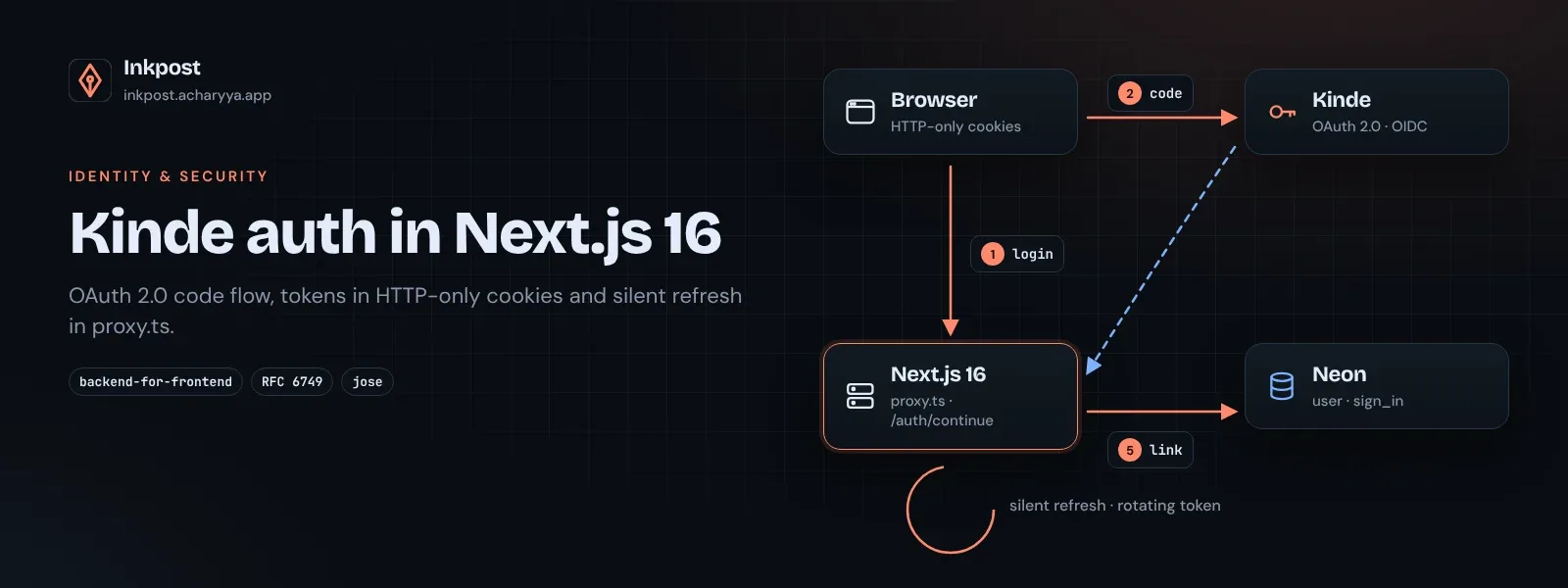
How Inkpost signs people in with OAuth 2.0 and Kinde, keeps every token in HTTP-only cookies, and refreshes sessions silently in proxy.ts.

7 min read
Inkpost lets readers, contributors and admins sign in with an email and password, a one-time email code or Google. None of those credentials live in our database. Kinde holds the credentials and issues the tokens; Inkpost holds the account: its role, status, tier and profile, in Neon Postgres. Everything in this post follows from that split.
The big picture
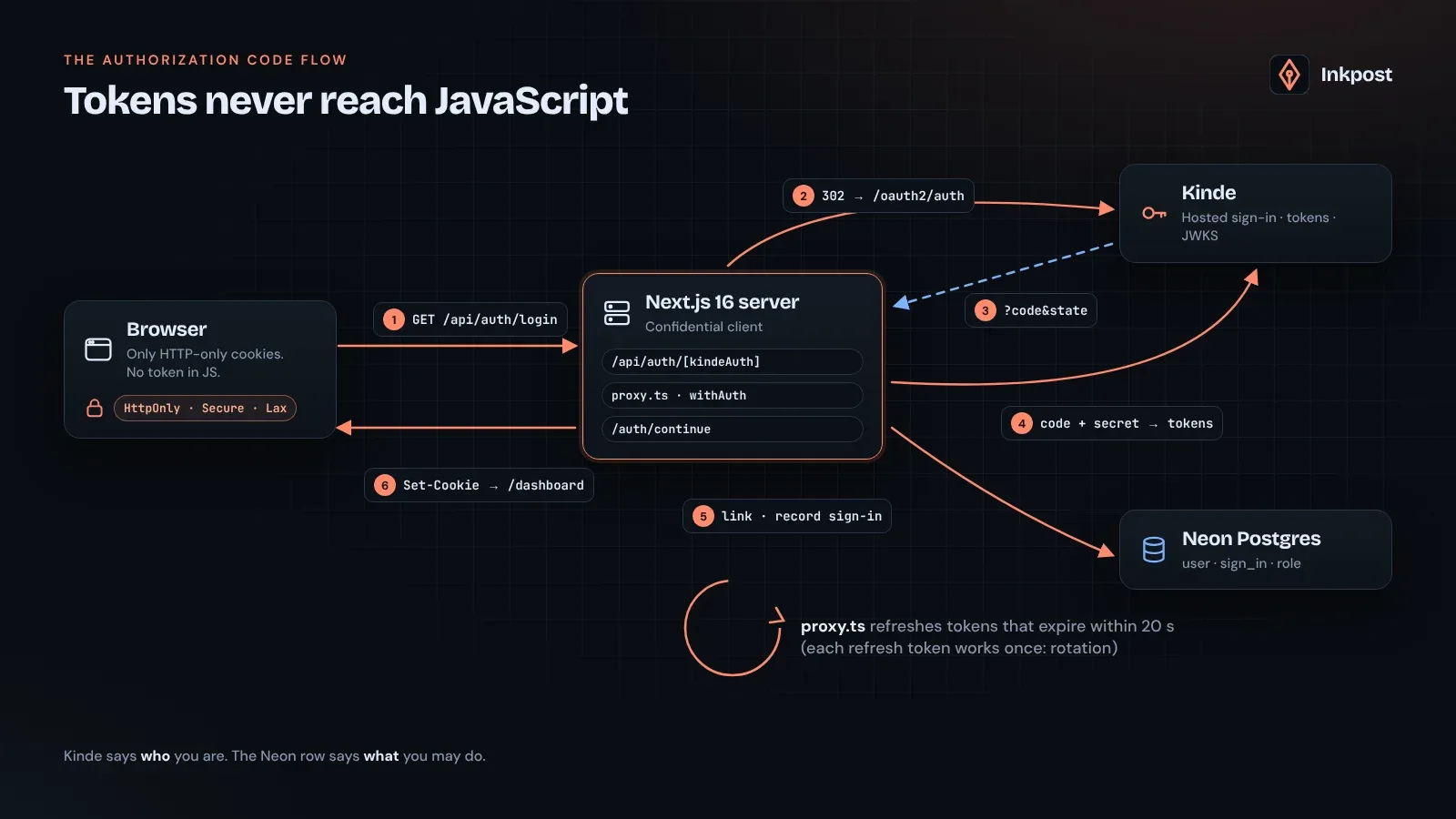
The pattern is called backend-for-frontend. The Next.js server is a confidential client: it exchanges the authorization code with a client secret the browser never sees, then stores the tokens in cookies marked HttpOnly, Secure and SameSite=Lax. There is no token in localStorage, ever.
The flow, step by step
"Log in" opens
/auth/sign-in, which sends the browser to/api/auth/login?via=….The route redirects to Kinde’s
/oauth2/authwithresponse_type=code, astatevalue andscope=openid profile email offline(offline asks for a refresh token).Kinde authenticates the person (password, email code or Google) and returns to
/api/auth/kinde_callback?code&state.The server checks
stateand swaps the code plus the client secret for access, ID and refresh tokens, stored as HTTP-only cookies./auth/continuefinds the account bykinde_id, else by a verified email, else creates one, then records the sign-in.On every panel request
proxy.tsrefreshes tokens that expire within 20 seconds, checks the role, and the page callsrequireArea().
Transcript
The same six steps, animated. Captions are on by default.
Configuration (dummy values only)
Every variable is validated with Zod when the server starts. A server without Kinde settings answers 503 and names the missing settings, never their values.
# .env.local (dummy values: replace with your own, never commit)KINDE_CLIENT_ID=0000demo0000client0000id00KINDE_CLIENT_SECRET=DUMMYsecretDUMMYsecretDUMMYsecretDUMMY0000KINDE_ISSUER_URL=https://your-app.kinde.comKINDE_SITE_URL=http://localhost:3000KINDE_POST_LOGIN_REDIRECT_URL=http://localhost:3000/auth/continueKINDE_POST_LOGOUT_REDIRECT_URL=http://localhost:3000# optional: KINDE_AUDIENCE=https://api.example.com# Only a VERIFIED email in this list becomes an adminINKPOST_ADMIN_EMAILS=admin@example.com// lib/env.ts (simplified)import { z } from "zod";const AuthEnv = z.object({ KINDE_CLIENT_ID: z.string().min(10), // The SDK silently won't refresh with anything else. KINDE_CLIENT_SECRET: z.string().regex(/^[A-Za-z0-9]{40,60}$/), KINDE_ISSUER_URL: z.url(), KINDE_SITE_URL: z.url(), KINDE_POST_LOGIN_REDIRECT_URL: z.url(), KINDE_POST_LOGOUT_REDIRECT_URL: z.url(), INKPOST_ADMIN_EMAILS: z.string().default(""),});export function authEnv() { const parsed = AuthEnv.safeParse(process.env); if (!parsed.success) { // Name the missing settings, never print their values. const names = parsed.error.issues.map((i) => i.path.join(".")); throw new Error(`Kinde isn't configured: ${names.join(", ")}`); } return parsed.data;}Only four auth routes
The SDK’s catch-all route can answer more than we need. We allow exactly four and refuse open redirects:
// app/api/auth/[kindeAuth]/route.tsimport { handleAuth } from "@kinde-oss/kinde-auth-nextjs/server";import { NextResponse, type NextRequest } from "next/server";const ALLOWED = new Set(["login", "register", "logout", "kinde_callback"]);export async function GET(req: NextRequest, ctx: { params: Promise<{ kindeAuth: string }> }) { const { kindeAuth } = await ctx.params; // setup, health and portal answer 404: we never expose them. if (!ALLOWED.has(kindeAuth)) return new NextResponse(null, { status: 404 }); // post_login_redirect_url must be a same-site path, or we refuse it. const next = req.nextUrl.searchParams.get("post_login_redirect_url"); if (next && !isSameSitePath(next)) return new NextResponse("Bad redirect", { status: 400 }); return handleAuth()(req, ctx);}function isSameSitePath(value: string) { return value.startsWith("/") && !value.startsWith("//") && !value.includes("\\");}Silent refresh in proxy.ts
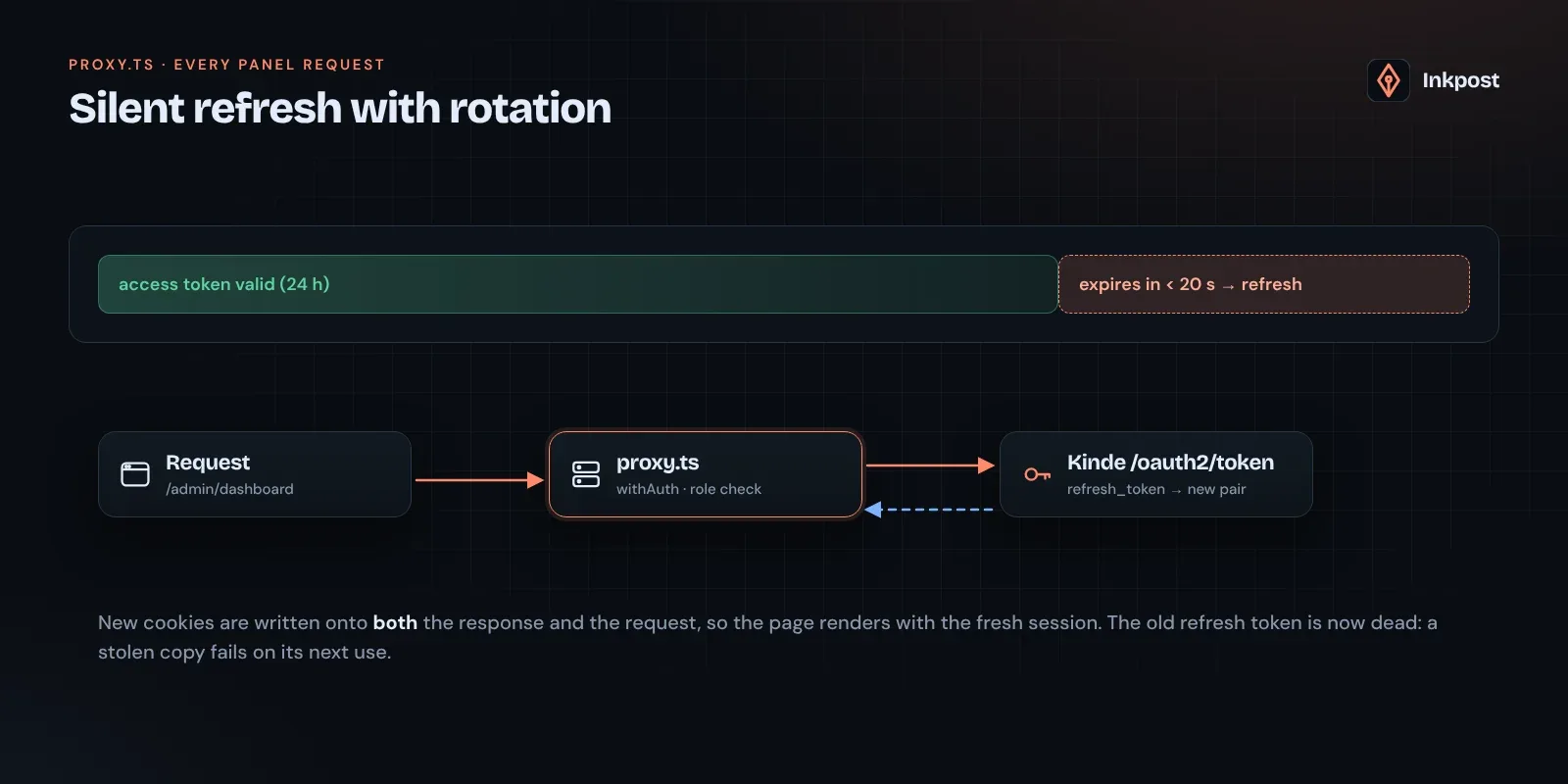
Next.js 16 renamed middleware to proxy.ts. Kinde’s withAuth runs there and writes the fresh cookies onto both the response and the incoming request, so the page renders with the new session.
// proxy.ts (simplified)import { withAuth } from "@kinde-oss/kinde-auth-nextjs/middleware";import type { NextRequest } from "next/server";import { areaRedirectFor } from "@/lib/areas";export default withAuth( async function proxy(req: NextRequest) { // Tokens were refreshed above if they expire within 20 s. // Redirect by role before anything renders. The page still checks again. return areaRedirectFor(req); }, { isReturnToCurrentPage: true },);export const config = { matcher: ["/admin/:path*", "/contributor/:path*", "/auth/continue"],};The proxy redirects. The page decides. Never trust the proxy alone for access.
The security boundary: requireArea
// lib/server/auth/session.ts (simplified)import "server-only";import { connection } from "next/server";import { getKindeServerSession } from "@kinde-oss/kinde-auth-nextjs/server";export async function getAuthSession() { await connection(); // stop prerendering: this reads the request const { isAuthenticated, getAccessToken } = getKindeServerSession(); if (!(await isAuthenticated())) return null; const token = await getAccessToken(); // The SDK doesn't check exp for us, so we do. if (!token?.exp || token.exp * 1000 <= Date.now()) return null; return { kindeId: token.sub };}// lib/server/auth/guards.ts (simplified)import { redirect } from "next/navigation";import { getCurrentUser } from "./users";export async function requireArea(area: "admin" | "contributor", path: string) { const user = await getCurrentUser(); // cached per request, read from Neon if (!user) redirect(`/auth/sign-in?next=${encodeURIComponent(path)}`); if (user.status !== "active") redirect(`/${user.role}/dashboard`); if (area === "admin" && user.role !== "admin") redirect(`/contributor/dashboard`); return user;}Bearer tokens for the API
/api/me accepts Authorization: Bearer and verifies it with jose against Kinde’s cached JWKS:
// lib/server/auth/bearer.ts (simplified)import { createRemoteJWKSet, jwtVerify } from "jose";const ISSUER = "https://your-app.kinde.com"; // dummyconst JWKS = createRemoteJWKSet(new URL(`${ISSUER}/.well-known/jwks`));export async function verifyBearer(header: string | null) { const token = header?.match(/^Bearer (.+)$/)?.[1]; if (!token) return null; const { payload } = await jwtVerify(token, JWKS, { issuer: ISSUER, algorithms: ["RS256"], audience: process.env.KINDE_AUDIENCE, // optional }); // checks exp / nbf too return payload;}Token lifetimes
Token | Lifetime | Where it lives |
|---|---|---|
| 24 hours | HTTP-only cookie |
| 1 hour | HTTP-only cookie |
| 15 days of inactivity, rotates on every use | HTTP-only cookie |
Recommended access lifetime | 15–60 minutes | (a known gap, see below) |
Hardening checklist
Account linking:
kinde_idfirst, then a verified email, then create. A race between two first requests is handled withON CONFLICT DO NOTHINGand a re-read.Admins: only a verified email in
INKPOST_ADMIN_EMAILS;is_adminis a generated column, and a trigger means an admin can never be deleted.Static public pages: a readable hint cookie (
inkpost_signed_in, not a credential) lets the home page show "Dashboard" without reading cookies on the server.Failed callbacks while signed out go back to our own sign-in page.
Known gaps
No PKCE in the SDK’s server flow.
A 24-hour access token.
MFA for admins isn’t enforced yet.
No identity linking across Google and email in Kinde.
Try it locally
Pin the exact versions we used:
npm install @kinde-oss/kinde-auth-nextjs@2.13.2 jose@6.2.12 zodWatch: OAuth 2.0 in ten minutes
Further reading


Takeaway: keep identity and authorization apart, keep tokens out of JavaScript, and check access on the server for every request.
Sources
- Inkpost's own authorization design (author's implementation), Suman Acharyya. Accessed 2026-11-17.How it was measured: This describes how Inkpost itself is built. Kinde only identifies the user; on every panel request proxy.ts checks the role, and each page calls requireArea(), with role and status read from the user's row in Neon Postgres rather than from token claims. The code later in this post shows both checks. Back to the text for source 1
- Kinde
- OAuth 2.0
- OpenID Connect
- Next.js
- Cookies