Databases · SQL & PostgreSQL
PostgreSQL 19, tested and explained: every new feature and what changes when you upgrade
REPACK without downtime, plan advice, WAIT FOR LSN, sequence replication, ON CONFLICT DO SELECT, COPY to JSON and the new defaults, each run on a real PostgreSQL 19.0 server, plus an upgrade checklist.

15 min read
PostgreSQL 19 was released on 19 November 2026, about two months later than usual, after several beta features were pulled rather than shipped half-ready. What did ship is about the work you do every week: removing table bloat without downtime, holding a query to a good plan when the planner changes its mind, reading your own writes from a replica, setting up logical replication without a restart, and a handful of SQL features that delete code from your application. This guide covers all of it, plus the defaults that change under you when you upgrade.Source [1]
Transcript
Where 19 fits: supported versions
Each major version is supported for five years, so 15 to 19 are now supported. Version 14 reached end of life on 12 November 2026, a week before 19 shipped.Source [2]
Version | Released | Supported until |
|---|---|---|
19 | 19 Nov 2026 | 19 Nov 2031 |
18 | 25 Sep 2025 | 14 Nov 2030 |
17 | 26 Sep 2024 | 8 Nov 2029 |
16 | 14 Sep 2023 | 9 Nov 2028 |
15 | 13 Oct 2022 | 11 Nov 2027 |
14 | 30 Sep 2021 | Ended 12 Nov 2026 |
What you already had in 18
Jumping from 16 or 17? These arrived in 18, and 19 builds on them:Source [3]
Feature (since 18) | What it gives you |
|---|---|
Asynchronous I/O ( | Reads issued ahead instead of one by one; 19 scales its workers |
| Time-ordered UUIDs that index well |
Virtual generated columns | Computed on read; the default kind since 18 |
| Before and after values in one |
| No long |
What didn't make it
Several features that appeared in 19's betas were reverted before release: SQL property graph queries (GRAPH_TABLE), partition merge and split, turning data checksums on and off while the server runs, GROUP BY ALL, and UPDATE/DELETE ... FOR PORTION OF. If you read about any of these in a beta-era post, they are not in 19.0. On the final build, GROUP BY ALL and GRAPH_TABLE are plain syntax errors. The earliest they can return is PostgreSQL 20.Source [4]
1. REPACK: remove bloat without taking the table offline
PostgreSQL never overwrites a row in place: an UPDATE writes a new version and a DELETE only marks the old one dead. VACUUM makes that space reusable but doesn't return it to the operating system. After deleting 80% of a million test orders and vacuuming, our table was still 63 MB with 31 MB of indexes.
Shrinking it used to mean VACUUM FULL or CLUSTER, which lock the table for the whole rewrite, or the third-party pg_repack extension. PostgreSQL 19 replaces both commands with REPACK; the old ones remain for compatibility.Source [5]
-- How bloated is it? (dummy store: 1M orders, then 80% deleted)SELECT pg_size_pretty(pg_table_size('orders')) AS table_size, pg_size_pretty(pg_indexes_size('orders')) AS index_size;-- table_size | index_size-- 63 MB | 31 MB-- Rebuild table + indexes while reads and writes continueREPACK (CONCURRENTLY, VERBOSE) orders;-- table_size | index_size-- 13 MB | 5976 kB-- What CLUSTER used to do: physically order rows by an index, then refresh statsREPACK (ANALYZE) orders USING INDEX orders_customer_idx;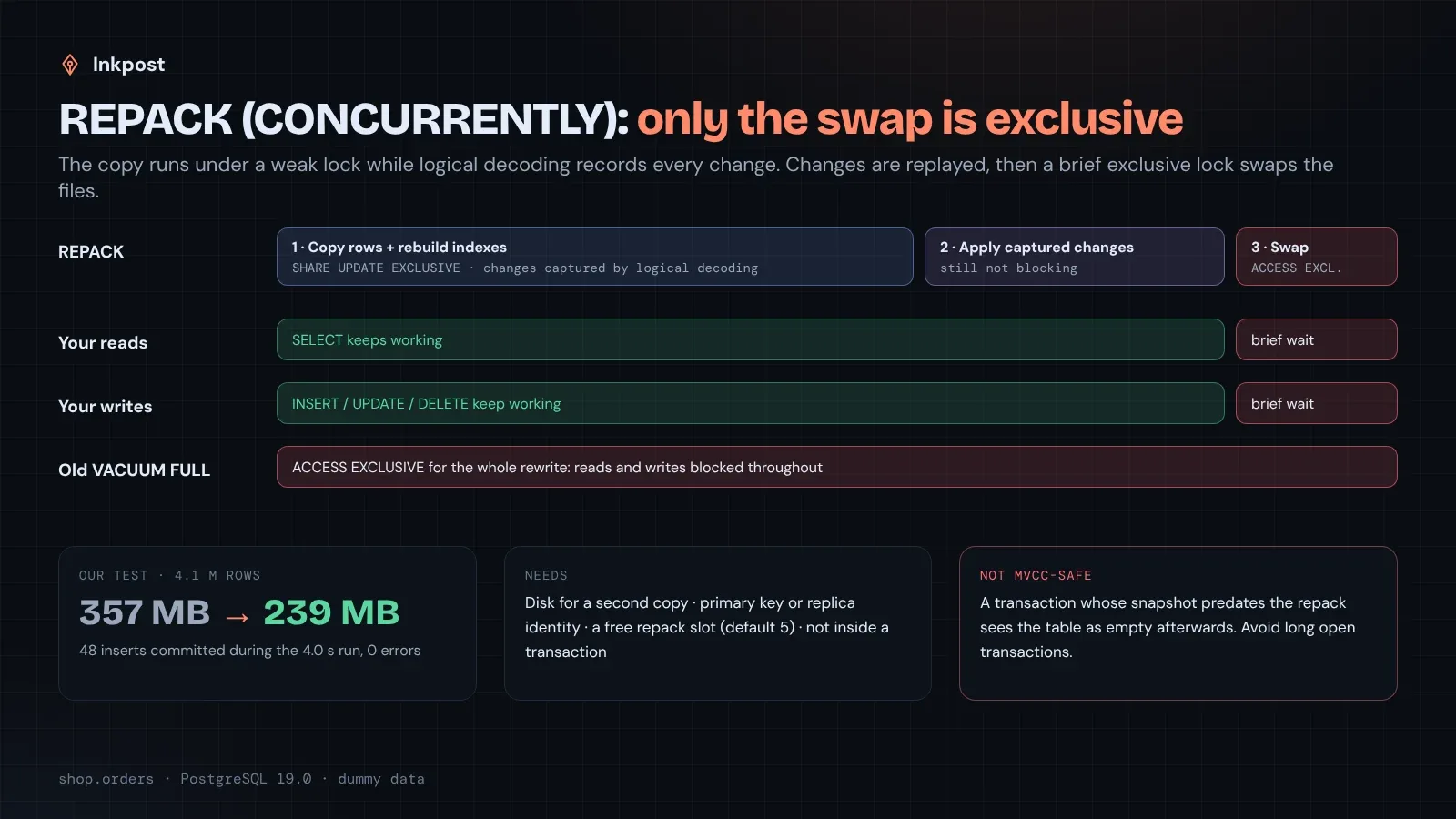
Plain REPACK holds an ACCESS EXCLUSIVE lock for the whole run. With CONCURRENTLY, the copy runs under a weaker SHARE UPDATE EXCLUSIVE lock while logical decoding records other sessions' changes; those are replayed, and only the final swap takes the exclusive lock. On a 4-million-row table (357 MB) under steady inserts, it finished in 4.0 seconds, 48 inserts committed during it, none failed, and the table came out at 239 MB.Source [6]
What concurrent repacking needs
Free disk space at least equal to the table plus all its indexes, because both copies exist until the swap.
A primary key or an index-based replica identity. It can't run on unlogged, partitioned or non-heap tables, materialized views or system catalogs, or inside a transaction block.
A free replication slot (
max_repack_replication_slots, default 5). While it runs, the effective WAL level is raised tologicalautomatically and drops back afterwards; we watched it happen.No DDL on the table while it runs, under about 104 million concurrently changed rows, and no long transactions near the final swap.
2. Autovacuum that keeps up, and tells you why
Autovacuum can now vacuum a table's indexes with parallel workers: opt in server-wide with autovacuum_max_parallel_workers (0 by default) and per table with the autovacuum_parallel_workers storage parameter. It picks what to process first with a scoring system, tunable through five autovacuum_*_score_weight settings. And ordinary queries can mark pages all-visible as they read them, saving later vacuum work and helping index-only scans.Source [7]
You can see the scores directly in a new view. After some deletes and updates on our test tables, autovacuum's queue looked like this:
SELECT relname, round(score::numeric, 2) AS score, do_vacuum, do_analyze
FROM pg_stat_autovacuum_scores ORDER BY score DESC LIMIT 4;

   relname    | score | do_vacuum | do_analyze
--------------+-------+-----------+------------
 accounts     |  9.52 | t         | t
 sales        |  2.50 | t         | t
 pg_attribute |  0.96 | f         | f
 pg_depend    |  0.85 | f         | f
New in 19 | Shows |
|---|---|
| Each table's priority score, its parts, and whether it's due |
| Waits and wait time per lock type |
| A standby's replay position and pause state |
| Progress of a running |
| Asynchronous I/O activity per plan node |
| WAL spent on full-page images |
3. Plan advice: hold a query to a plan you trust
The planner is usually right, but skewed data can fool it. In our test store, 1% of accounts are enterprise customers placing 30% of orders. Underestimate that and the planner may do an index lookup per account instead of one hash join. Forcing each plan shows the difference:
Plan (same query, 2 million sales) | Execution time | Buffers touched |
|---|---|---|
Nested loop + index scan per account | 324 ms | 394,791 |
Hash join | 64 ms | 12,904 |
Version 19 adds a supported alternative to hints in two contrib modules. pg_plan_advice describes the planner's key decisions in a small advice language, lets you supply advice, and reports whether it was followed. pg_stash_advice applies stored advice by query ID, so you can fix a regressed query without touching application code.Source [8]
shared_preload_libraries = 'pg_plan_advice, pg_stash_advice'-- 1. See the planner's decisions as adviceEXPLAIN (COSTS OFF, PLAN_ADVICE)SELECT a.plan, sum(s.amount)FROM accounts a JOIN sales s ON s.account_id = a.idWHERE a.plan = 'enterprise' GROUP BY a.plan;-- Generated Plan Advice: JOIN_ORDER(s a) HASH_JOIN(a) SEQ_SCAN(s a) GATHER((a s))-- 2. Try advice in this session; feedback shows it was usedSET pg_plan_advice.advice = 'JOIN_ORDER(s a) HASH_JOIN(a)';-- Supplied Plan Advice: JOIN_ORDER(s a) /* matched */ HASH_JOIN(a) /* matched */-- 3. Apply it automatically by query ID (from EXPLAIN (VERBOSE) or pg_stat_statements)CREATE EXTENSION pg_stash_advice;SELECT pg_create_advice_stash('prod');SELECT pg_set_stashed_advice('prod', -2422606971101914697, 'JOIN_ORDER(s a) HASH_JOIN(a)');ALTER DATABASE shop SET pg_stash_advice.stash_name = 'prod';Advice constrains the planner rather than replacing it: it rules out alternatives, so you only get plans the planner would have considered, and impossible advice yields nodes marked Disabled: true, never an error. Feedback (matched, partially matched, not matched, failed) shows what happened. Tags cover join order (JOIN_ORDER), join methods (HASH_JOIN, NESTED_LOOP_PLAIN, MERGE_JOIN_PLAIN...), scans (SEQ_SCAN, INDEX_SCAN, BITMAP_HEAP_SCAN...) and parallelism (GATHER, NO_GATHER).Source [9]
Overriding its judgment can easily backfire.
PostgreSQL 19 documentation, pg_plan_advice
4. Logical replication without restarts, now with sequences
Logical replication used to need wal_level = logical, which meant a restart planned weeks ahead. In 19, with the default replica, the server raises its effective level to logical automatically when the first logical slot is created; the read-only effective_wal_level shows what's in use.Source [10]
The other gap was sequences: rows were copied but sequence values weren't, so the first inserts after a migration failed with duplicate keys. Publications can now include ALL SEQUENCES, and FOR ALL TABLES accepts an EXCEPT list.
-- PUBLISHER (19), wal_level still 'replica', no restartCREATE PUBLICATION shop_pub FOR ALL TABLES EXCEPT (TABLE audit_log), ALL SEQUENCES;-- SUBSCRIBER (schema created first with pg_dump --schema-only)CREATE SUBSCRIPTION shop_sub CONNECTION 'host=pg19-primary.internal dbname=shop user=replicator' PUBLICATION shop_pub;-- PUBLISHER: SHOW effective_wal_level; -> logical (raised by the new slot)-- Rows stream, sequences don't (publisher 12, subscriber 9). At cutover:ALTER SUBSCRIPTION shop_sub REFRESH SEQUENCES; -- subscriber now 12Also new: CREATE SUBSCRIPTION ... SERVER takes connection settings from a foreign server (for example one defined for postgres_fdw) instead of a connection string; retain_dead_tuples detects updates that conflict with a concurrent delete when several systems write the same data; and postgres_fdw's import_stats option imports remote statistics during ANALYZE instead of sampling rows over the network.
5. WAIT FOR LSN: read your own writes from a replica
Sending reads to replicas is the easiest way to scale PostgreSQL, until a customer places an order and the next page, served by a slightly-behind replica, says they have none. The usual workarounds are sleeps, polling or reading from the primary.
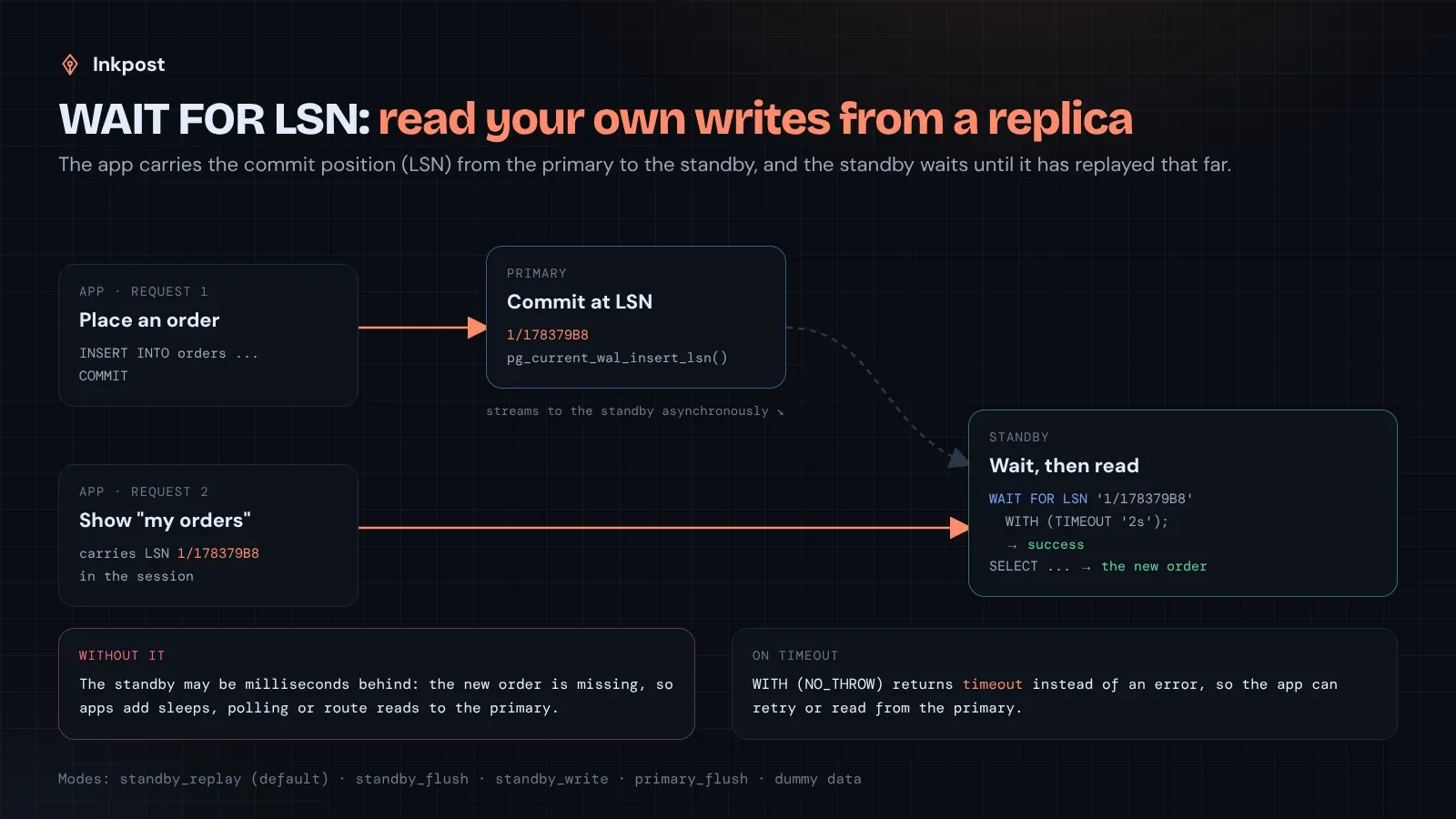
Every change has a position in the write-ahead log, its LSN. After a write commits, the application takes the primary's current LSN and carries it with the user's session. Before reading on the replica, it runs WAIT FOR LSN, which blocks until the replica has replayed that far:
-- PRIMARY, right after the write commitsINSERT INTO customers (email, name) VALUES ('meera@example.com', 'Meera Sen');SELECT pg_current_wal_insert_lsn(); -- 1/178379B8, keep it in the session-- STANDBY, before readingWAIT FOR LSN '1/178379B8' WITH (TIMEOUT '2s'); -- successSELECT id, email FROM customers WHERE email = 'meera@example.com';-- Status instead of an error: success | timeout | not in recoveryWAIT FOR LSN '1/178379B8' WITH (TIMEOUT '200ms', NO_THROW);Mode | Waits until | Runs on |
|---|---|---|
| The LSN has been replayed, so the data is visible to queries | Standby |
| The WAL is flushed to the standby's disk (durable, maybe not yet visible) | Standby |
| The WAL is written, but maybe not flushed (fastest, weakest)Source [12] | Standby |
| The WAL is flushed on the primary | Primary |
Without NO_THROW, a timeout is an error that aborts the transaction; with it, the application gets a status and decides whether to retry or read from the primary. The default mode errors on a primary, as we confirmed.
6. SQL that removes application code
ON CONFLICT DO SELECT: get or create in one statement
"Find the customer by email, or create them" used to be awkward. DO NOTHING returns no row when the customer exists, so you need a second query, and the usual no-op DO UPDATE trick writes a new row version every time. DO SELECT returns the existing row without writing anything:
CREATE TABLE customers ( id int GENERATED ALWAYS AS IDENTITY PRIMARY KEY, email text NOT NULL UNIQUE, name text NOT NULL, tier text NOT NULL DEFAULT 'free');-- Get or create, one statement, no write when the row existsINSERT INTO customers (email, name)VALUES ('asha@example.com', 'Asha R.'), -- exists: returned as is ('dev@example.com', 'Dev Kumar') -- new: insertedON CONFLICT (email) DO SELECTRETURNING id, email, name;-- id | email | name-- 1 | asha@example.com | Asha Rao-- 5 | dev@example.com | Dev Kumar-- Add FOR UPDATE to lock the existing row for the rest of the transaction-- ... ON CONFLICT (email) DO SELECT FOR UPDATE RETURNING id;I checked: after DO SELECT the row's xmin and ctid were unchanged, while the no-op DO UPDATE wrote a new version. DO SELECT needs a conflict target such as (email), and identity values are still used up on conflicts, which is why Dev's id is 5, not 2.Source [13]
JSON, window functions and test data
-- COPY to JSON: one object per line, or one array with FORCE_ARRAYCOPY (SELECT id, email, tier FROM customers ORDER BY id) TO STDOUT (FORMAT json);-- {"id":1,"email":"asha@example.com","tier":"free"}-- {"id":5,"email":"dev@example.com","tier":"pro"}-- IGNORE NULLS: carry the last known price forwardSELECT at, price, last_value(price) IGNORE NULLS OVER (ORDER BY at) AS last_knownFROM price_ticks ORDER BY at;-- 2026-11-21 | NULL | 101.5 (gap filled)-- JSON path string methodsSELECT jsonb_path_query('{"sku":" kb-Mech-87 "}', '$.sku.btrim().upper()'); -- "KB-MECH-87"-- random() for dates and timestampsSELECT random('2026-01-01'::date, '2026-12-31'::date);COPY ... (FORMAT json)is output only:COPY FROMdoesn't accept JSON, andHEADER,DELIMITERandNULLoptions are rejected. A SQLNULLand a JSONnullvalue look the same in the output.Behaviour change:
json_array()over zero rows now returns[]instead ofNULL. Check code that tests forNULL.
7. Faster without changing anything
Foreign-key checks are cheaper. The release announcement reports bulk inserts into tables with foreign keys running nearly twice as fast in testing.
NOT IN (subquery)becomes an anti-join when noNULLs are possible; on our tables the plan now readsNested Loop Anti Joinwith an index-only scan.Eager aggregation: the planner can aggregate before a join so it joins far fewer rows. On by default (
enable_eager_aggregate), used when grouping shrinks rows at least eightfold (min_eager_agg_group_size).Source [14]Asynchronous I/O workers scale themselves. With
io_method = worker, the default, the number of I/O workers moves betweenio_min_workers(2) andio_max_workers(8). These replace the old fixedio_workerssetting.Source [15]
8. Defaults and security changes to check
These are the changes most likely to surprise you after an upgrade. Every value below is what a fresh 19.0 server reported:Source [16]
Setting | 18 | 19 | What to do |
|---|---|---|---|
| on | off | Re-enable only for heavy analytical roles |
| pglz | lz4 | Faster; existing data isn't recompressed |
| 64 | 128 | Allocation changed: double any custom value |
| off | on | More log lines on contended systems |
| fixed | removed | Use |
| - | 7 days | Warns before a |
| - | on | MD5 logins log a warning; move to SCRAM |
| settable | always on | Old dumps made with it off won't load |
RADIUS authentication is gone. It only supported UDP, which the project considers unfixably insecure. Move those users to another method before upgrading.
TLS Server Name Indication: one server can present different certificates for different host names, mapped in the new
pg_hosts.conffile. Useful when one server answers to several domains.READ ONLYtransactions now carry over topostgres_fdw, and parallelVACUUMworkers share onevacuum_cost_limitwith their leader, so throttled parallel vacuum may be slower.Source [17]
9. Upgrading to 19
Going from any earlier major version needs pg_upgrade, a dump and restore, or logical replication, which 19 now makes easier with sequence sync. pg_upgrade refuses to proceed in a few cases, so run its check first:Source [18]
# 1. Dry run: reports incompatibilities (btree_gist inet/cidr indexes,# names with line breaks, MULE_INTERNAL encoding...) without touching datapg_upgrade --check \ --old-bindir /usr/lib/postgresql/18/bin --new-bindir /usr/lib/postgresql/19/bin \ --old-datadir /var/lib/postgresql/18/main --new-datadir /var/lib/postgresql/19/main# 2. The real upgrade. --swap moves the data directory instead of copying it;# planner statistics are carried over, so no long ANALYZE before trafficpg_upgrade --swap --jobs 8 \ --old-bindir /usr/lib/postgresql/18/bin --new-bindir /usr/lib/postgresql/19/bin \ --old-datadir /var/lib/postgresql/18/main --new-datadir /var/lib/postgresql/19/main# 3. After starting 19: rebuild text-search, pg_trgm and fuzzystrmatch indexespsql -d shop -c "REINDEX INDEX CONCURRENTLY products_name_trgm_idx;"Rehearse on a copy of production with your real extensions, drivers and queries, and confirm every extension has a 19 build.
Run
pg_upgrade --check. Replacebtree_gistindexes oninet/cidrcolumns, rename anything with a line break in its name (databases, roles, tablespaces) and move off the removedMULE_INTERNALencoding.After the upgrade, reindex full-text search,
pg_trgmandfuzzystrmatchindexes and recompute storedtsvectorvalues; they now follow the database's locale provider.Then adopt the new tools one at a time: repack your most bloated table, add advice for the one query that keeps regressing, and use
WAIT FOR LSNwhere you read from replicas.
Transcript
Go further
The official release notes list every change in PostgreSQL 19, including many smaller items not covered here:

PostgreSQL 19 turns jobs that used to need extensions, restarts or application code into plain SQL. That's the kind of release that pays off every week.
Sources
- Release 19, PostgreSQL Global Development Group. Accessed 2026-11-27. Back to the text for source 1
- Versioning Policy, PostgreSQL Global Development Group. Accessed 2026-11-27. Back to the text for source 2
- PostgreSQL 18 Released!, PostgreSQL Global Development Group. Accessed 2026-11-27. Back to the text for source 3
- PostgreSQL 19: What changed, what matters, and what to test now, EDB. Accessed 2026-11-27. Back to the text for source 4
- PostgreSQL 19 Released!, PostgreSQL Global Development Group. Accessed 2026-11-27. Back to the text for source 5
- REPACK, PostgreSQL 19 Documentation. Accessed 2026-11-27. Back to the text for source 6
- Release 19, PostgreSQL Global Development Group. Accessed 2026-11-27. Back to the text for source 7
- pg_plan_advice, PostgreSQL 19 Documentation. Accessed 2026-11-27. Back to the text for source 8
- pg_plan_advice, PostgreSQL 19 Documentation. Accessed 2026-11-27. Back to the text for source 9
- Logical Replication, PostgreSQL 19 Documentation. Accessed 2026-11-27. Back to the text for source 10
- Replicating Sequences, PostgreSQL 19 Documentation. Accessed 2026-11-27. Back to the text for source 11
- WAIT FOR, PostgreSQL 19 Documentation. Accessed 2026-11-27. Back to the text for source 12
- INSERT, PostgreSQL 19 Documentation. Accessed 2026-11-27. Back to the text for source 13
- Query Planning, PostgreSQL 19 Documentation. Accessed 2026-11-27. Back to the text for source 14
- Resource Consumption, PostgreSQL 19 Documentation. Accessed 2026-11-27. Back to the text for source 15
- Release 19: Migration to Version 19, PostgreSQL Global Development Group. Accessed 2026-11-27. Back to the text for source 16
- Release 19: Migration to Version 19, PostgreSQL Global Development Group. Accessed 2026-11-27. Back to the text for source 17
- pg_upgrade, PostgreSQL 19 Documentation. Accessed 2026-11-27. Back to the text for source 18
- PostgreSQL
- Databases
- Replication
- Performance optimization
- Database migrations