Security · Web security & OWASP
ZAP and OWASP, hands-on: find, fix and block SQL injection, path traversal and XSS
Build a deliberately broken store, attack it by hand, scan it with ZAP 2.17, fix each hole the way OWASP recommends, then gate every pull request with the Automation Framework and GitHub Actions. Tested code for every step.

30 min read
A web app can pass every unit test and still hand its database to anyone who types a quote mark into a search box. Unit tests check that the app does what you meant. Security testing checks what it does when someone sends what you didn't expect. ZAP is the most widely used free tool for that second job: it attacks a running app the way an outsider would and reports what broke. This post builds a small, deliberately broken store, attacks it by hand, scans it with ZAP, fixes the code properly, and then puts the scan into a CI pipeline so the holes can't quietly come back.
The store, and why a quote mark matters
Pagecraft Books is a tiny online shop for tech books. It has three features: a product search, a page where customers download their invoices, and a box where they preview a review before posting it. It also has a hidden product in its database, an unreleased router marked confidential, that the search is supposed to hide.
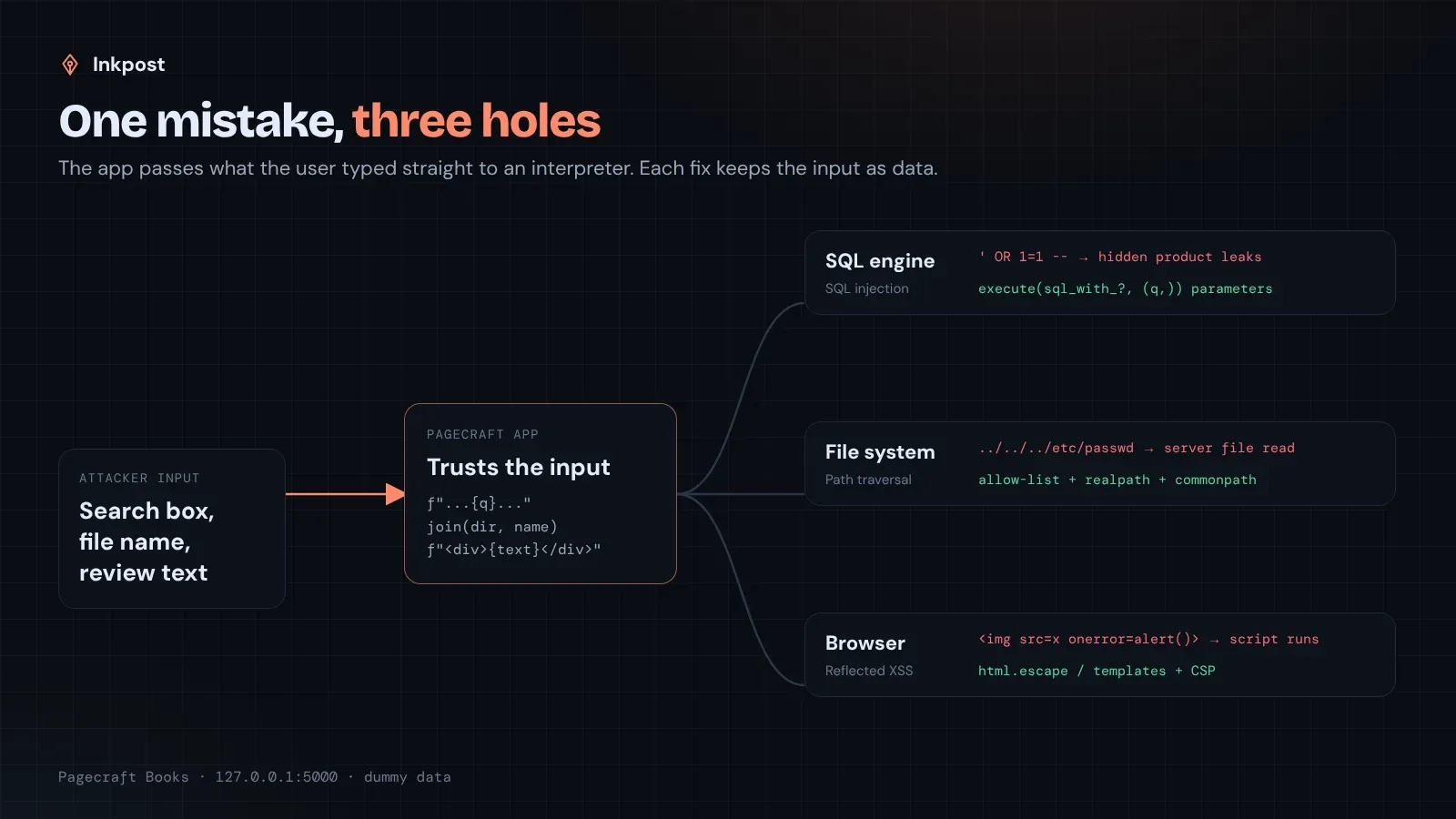
Each feature takes text from the user and passes it on somewhere: the search passes it to the database, the invoice page to the file system, the review preview to the browser. In the broken version, none of them checks what it passes on. That one mistake, trusting input, is behind all three holes we're about to find.
1. DAST, SAST and where ZAP fits
There are three common ways to look for security bugs automatically, and they find different things. Static testing (SAST) reads your source code without running it. Software composition analysis (SCA) checks your third-party packages against lists of known vulnerabilities. Dynamic testing (DAST) runs nothing of yours at all: it sends requests to the running app and judges the responses, exactly like an attacker on the internet would. ZAP is a DAST tool.
Approach | Looks at | Good at | Misses |
|---|---|---|---|
SAST (e.g. Semgrep, CodeQL) | Source code | Dangerous patterns early, exact line numbers | Config, server and runtime problems; many false positives |
SCA (e.g. Dependabot, OSV-Scanner) | Your dependency list | Known CVEs in libraries | Bugs in your own code |
DAST (ZAP) | The running app over HTTP | Real, exploitable behaviour; headers; server config | Code it never reaches; business logic; needs a running app |
ZAP (originally the Zed Attack Proxy) began as a flagship OWASP project, which is why many people still call it OWASP ZAP. OWASP, now the Open Worldwide Application Security Project, is a non-profit that publishes free security guides and tools. In September 2024 ZAP's three project leaders joined Checkmarx, which now employs them to work on ZAP; the project is known as ZAP by Checkmarx but stays open source under the Apache 2.0 licence and is controlled by its own core team.Source [2]Source [3]
What the OWASP Top 10:2025 means for this post
The OWASP Top 10 is the best-known list of the most serious risks to web apps. The 2025 edition was unveiled in November 2025 and added two new categories, Software Supply Chain Failures and Mishandling of Exceptional Conditions. Our three bugs map onto it like this, and the table also shows how well a DAST scan can see each category:Source [4]Source [5]
OWASP Top 10:2025 | In this post | Can ZAP find it? |
|---|---|---|
A01 Broken Access Control | Path traversal reads a file outside the invoice folder | Partly: traversal yes; per-user access rules need authenticated, multi-user tests |
A02 Security Misconfiguration | Debugger left on, missing security headers | Yes, passive rules catch most of these |
A03 Software Supply Chain Failures | Not covered | No, use SCA |
A05 Injection | SQL injection in search, XSS in review preview | Yes, this is ZAP's strongest area |
A10 Mishandling of Exceptional Conditions | Stack traces shown to users | Partly, via error-disclosure rules |
2. Install ZAP
ZAP comes as a desktop app for exploring an app by hand and as a Docker image for automation. The desktop app needs Java 17 or newer on Windows and Linux; the macOS build bundles its own Java. For CI you only need Docker.Source [1]
# Desktop app (needs Java 17+, bundled on macOS)winget install --id=ZAP.ZAP -e # Windowsbrew install --cask zap # macOSsudo snap install zaproxy --classic # Linux (or: flatpak install flathub org.zaproxy.ZAP)# Docker image (what CI uses)docker pull ghcr.io/zaproxy/zaproxy:stabledocker run --rm ghcr.io/zaproxy/zaproxy:stable zap.sh -cmd -versionDocker tag | Updated | Use it for |
|---|---|---|
stable | Each ZAP release, rebuilt monthly with fresh add-ons | CI pipelines and anything you want predictable |
weekly | Usually every Monday | Trying the newest scan rules and features |
nightly | At least daily | ZAP development and bug reports |
bare | Same as stable, minimal | Custom images; it has no packaged scan scripts |
The same images are published as zaproxy/zap-stable (and friends) on Docker Hub; the two registries are interchangeable. Older guides that use the owasp/zap2docker or softwaresecurityproject names are out of date, so switch to zaproxy.Source [6]
3. Build the practice app
You need Python 3.13 and five small files. seed.py creates the database, including the hidden product:
# seed.py - creates store.db with dummy products (one of them unreleased)import osimport sqlite3DB_PATH = os.path.join(os.path.dirname(os.path.abspath(__file__)), "store.db")PRODUCTS = [ (1, "Cloud Patterns Field Guide", 799.0, 1), (2, "Practical Linux Handbook", 649.0, 1), (3, "Kubernetes Pocket Manual", 549.0, 1), (4, "Orbit Edge Router - CONFIDENTIAL, launches 2027", 0.0, 0),]if __name__ == "__main__": if os.path.exists(DB_PATH): os.remove(DB_PATH) conn = sqlite3.connect(DB_PATH) conn.execute( "CREATE TABLE products (id INTEGER PRIMARY KEY, title TEXT NOT NULL," " price REAL NOT NULL, released INTEGER NOT NULL)" ) conn.executemany("INSERT INTO products VALUES (?, ?, ?, ?)", PRODUCTS) conn.commit() conn.close() print(f"seeded {len(PRODUCTS)} products into {DB_PATH}")app_vulnerable.py is the broken store. Each bug is marked so you can find it again later:
# app_vulnerable.py - Pagecraft Books, deliberately insecure. Run it only on your own machine.import osimport sqlite3from flask import Flask, jsonify, request, send_fileapp = Flask(__name__)BASE_DIR = os.path.dirname(os.path.abspath(__file__))INVOICE_DIR = os.path.join(BASE_DIR, "invoices")DB_PATH = os.path.join(BASE_DIR, "store.db")def db(): conn = sqlite3.connect(DB_PATH) conn.row_factory = sqlite3.Row return conn@app.get("/api/search")def search(): q = request.args.get("q", "") # BUG: user input is glued into the SQL text sql = f"SELECT id, title, price FROM products WHERE title LIKE '%{q}%' AND released = 1" rows = db().execute(sql).fetchall() return jsonify([dict(r) for r in rows])@app.get("/api/invoices")def invoice(): name = request.args.get("file", "") # BUG: the name is joined to the folder without any check return send_file(os.path.join(INVOICE_DIR, name), mimetype="text/plain")@app.post("/reviews/preview")def review_preview(): text = request.form.get("text", "") # BUG: the review is pasted into HTML as-is return f"<h2>Your review</h2><div class='review'>{text}</div>"@app.get("/openapi.json")def openapi(): return send_file(os.path.join(BASE_DIR, "openapi.json"))if __name__ == "__main__": app.run(host="127.0.0.1", port=5000, debug=True) # BUG: debugger left onFinally, openapi.json describes the API: every path, every parameter and a default value for each. Here is the start of it (the full file has all three operations):
{ "openapi": "3.1.1", "info": { "title": "Pagecraft Books API", "version": "1.0.0" }, "servers": [ { "url": "http://localhost:5000" } ], "paths": { "/api/search": { "get": { "summary": "Search released products", "parameters": [ { "name": "q", "in": "query", "required": true, "schema": { "type": "string", "default": "cloud" } } ], "responses": { "200": { "description": "Matching products" } } } }, "/api/invoices": { "get": { "summary": "Download an invoice", "parameters": [ { "name": "file", "in": "query", "required": true, "schema": { "type": "string", "default": "invoice_1001.txt" } } ], "responses": { "200": { "description": "Invoice text" } } } }, "/reviews/preview": { "post": { "summary": "...form field \"text\", default \"Great book\" (full file in the repo)" } } }}Developers like an OpenAPI file because it documents the API. An attacker likes it for the same reason: it's a list of every door. ZAP reads the same list, which is why scanning an API with its definition finds far more than letting ZAP guess. Start the app:Source [7]
mkdir pagecraft && cd pagecraft # put the files from this post herepython3 -m venv .venv && source .venv/bin/activate # Windows: .venv\Scripts\activatepip install flask==3.1.3 pytestpython seed.py # creates store.db with 4 productspython app_vulnerable.py # listens on http://127.0.0.1:5000 only4. Attack it by hand first
Before any tool, try the three attacks yourself with curl. Seeing hidden data appear is the fastest way to understand what a scanner is looking for.
# 1. Normal search, then SQL injectioncurl -s "http://127.0.0.1:5000/api/search?q=cloud"curl -s -G "http://127.0.0.1:5000/api/search" --data-urlencode "q=' OR 1=1 --"# 2. Path traversal (--path-as-is stops curl from cleaning up the ../ for you)curl -s --path-as-is "http://127.0.0.1:5000/api/invoices?file=../../../../../../etc/passwd" | head -2# 3. Reflected XSS in the review previewcurl -s -X POST http://127.0.0.1:5000/reviews/preview \ --data-urlencode "text=<img src=x onerror=\"alert('XSS')\">"The normal search for cloud returns one book. The second search returns four products, including Orbit Edge Router - CONFIDENTIAL, launches 2027. The invoice request prints the first lines of the server's /etc/passwd (on Windows the same trick reaches files such as C:\Windows\win.ini). The review preview sends your image tag back inside the page exactly as typed, so in a browser the broken image fires onerror and an alert box appears.
Why the search leaked
The code builds the SQL by pasting the search text into the middle of it. With ' OR 1=1 -- the database receives ... WHERE title LIKE '%' OR 1=1 --%' AND released = 1. The quote closes the search text early, OR 1=1 is true for every row, and -- turns the rest of the line, including AND released = 1, into a comment. The user's text stopped being data and became part of the command. That's SQL injection.
Why the invoice page leaked
os.path.join(INVOICE_DIR, name) happily builds invoices/../../../../../../etc/passwd. Every ../ climbs one folder, extra ones stop at the root, and then the path walks down into /etc. The code never checks where the final path ends up. That's path traversal.
Why the review preview is dangerous
The review text goes into the HTML unchanged, so the browser treats it as markup. Here it only shows an alert, but the same trick can read a victim's page, send requests as them or steal a session token that isn't protected by HttpOnly. Because the payload comes back in the response to the request that carried it, this is reflected cross-site scripting (XSS).
Put the three side by side and the pattern is obvious: each time, the app took what the user typed and handed it to an interpreter, the SQL engine, the file system or the browser, without making sure it could only be data.
5. How ZAP sees an app
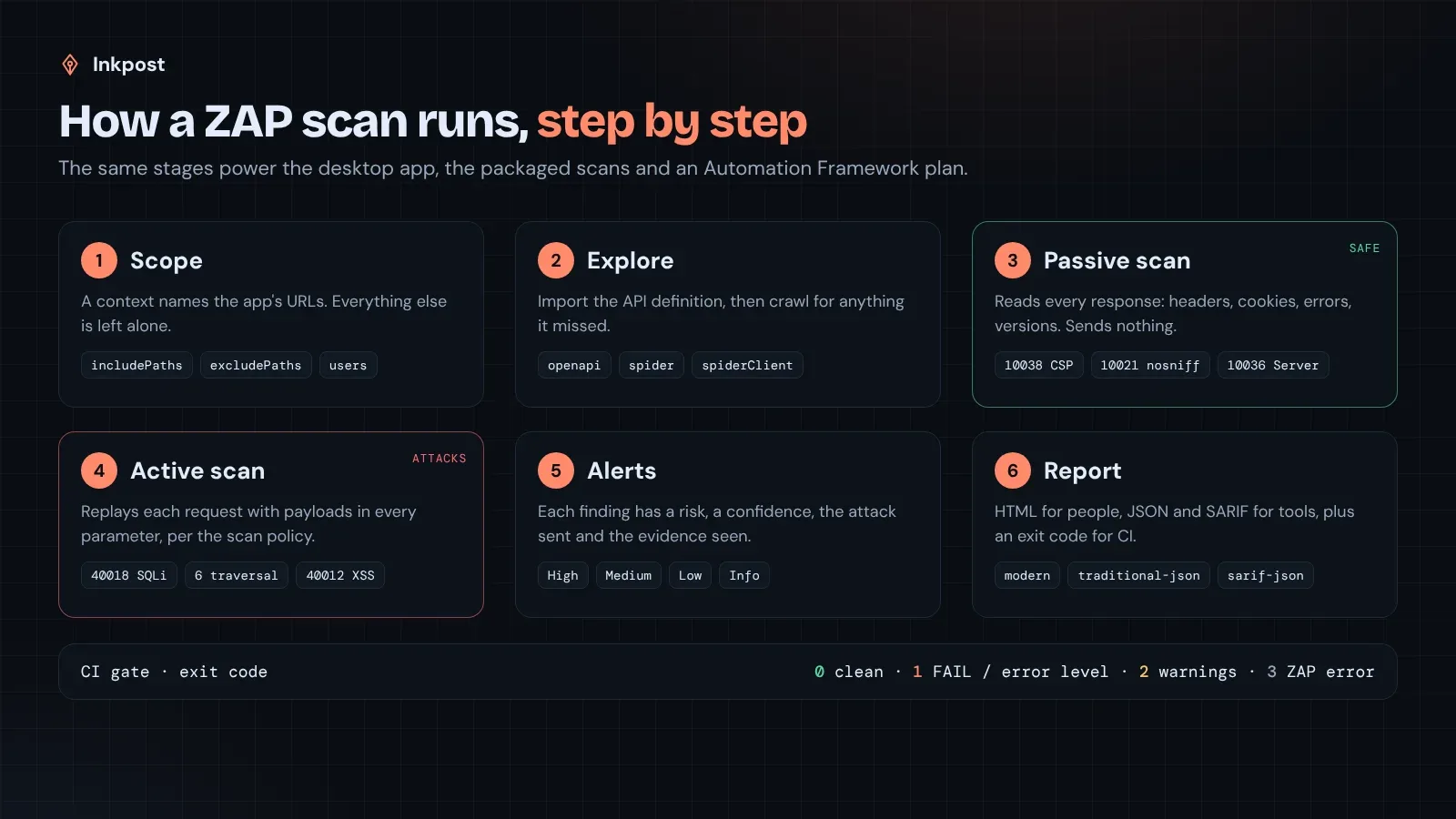
ZAP sits between a client and the app as a proxy, records every request and response, and builds a tree of everything it has seen, the Sites tree. Everything else builds on that recording.Source [8]
Concept | What it means |
|---|---|
Context | A named set of URLs (regexes) that ZAP treats as the app. Scope, authentication and users all hang off a context. |
Spider | Finds pages by following links and forms. Fast, but blind to pages built by JavaScript. |
Client Spider | Drives real browsers through the ZAP Browser Extension to explore JavaScript-heavy apps. ZAP's recommended crawler for modern apps since July 2026. |
Import (OpenAPI, GraphQL, SOAP, Postman) | Seeds the Sites tree from an API definition instead of crawling. |
Passive scan | Checks every response ZAP sees without sending anything extra: headers, cookies, error messages, leaked versions. Safe to run anywhere. |
Active scan | Re-sends each request with attack payloads in every parameter and judges the responses. Finds injection and traversal; can change data. |
Scan policy | Which active rules run, how hard they try (strength: Low to Insane) and how sure they must be to report (threshold: Low to High). |
Alert | A finding, with a risk (High, Medium, Low, Informational), a confidence, the URL, the parameter, the attack and the evidence. |
An active scan is clever but not magic. For SQL injection it sends a quote to break the query and boolean pairs like AND 1=1 versus AND 1=2 to see whether the page changes. For traversal it tries ../ sequences towards well-known files. For XSS it sends a marker inside HTML and checks whether it comes back unescaped. The evidence it finds goes into the alert so you can reproduce it.
6. The three packaged scans
The Docker image ships three ready-made scan scripts. They're the quickest way to get a result and they map neatly onto how cautious you need to be:Source [6]
Script | What it does | Safe on shared environments? | Typical run time |
|---|---|---|---|
zap-baseline.py | Spiders for one minute, then reports passive findings only | Yes, it sends no attacks | 1 to 3 minutes |
zap-api-scan.py | Imports an OpenAPI, GraphQL or SOAP definition and actively scans every operation | No, staging or local only | Minutes, grows with the API |
zap-full-scan.py | Spiders with no time limit, then runs a full active scan | No, staging or local only | Tens of minutes or more |
# Linux: --network host lets the container reach the app on 127.0.0.1:5000# Docker Desktop (Windows/macOS): drop --network host and use http://host.docker.internal:5000# PowerShell: use ${PWD} instead of $(pwd)# Baseline: spider + passive rules only. Safe for shared environments.docker run --rm --network host -v "$(pwd)":/zap/wrk/:rw -t ghcr.io/zaproxy/zaproxy:stable \ zap-baseline.py -t http://127.0.0.1:5000 -r baseline.html# API scan: imports the OpenAPI file, then attacks every operation in itdocker run --rm --network host -v "$(pwd)":/zap/wrk/:rw -t ghcr.io/zaproxy/zaproxy:stable \ zap-api-scan.py -t http://127.0.0.1:5000/openapi.json -f openapi \ -c .zap/rules.tsv -r api-report.html -J api-report.json# Full scan: spider + active attack of everything it found (allow 10+ minutes)docker run --rm --network host -v "$(pwd)":/zap/wrk/:rw -t ghcr.io/zaproxy/zaproxy:stable \ zap-full-scan.py -t http://127.0.0.1:5000 -j --client-spider -r full.htmlecho "exit code: $?" # 0 clean, 1 at least one FAIL, 2 WARNs only, 3 ZAP errorBy default every alert counts as a warning. A rules file changes that per rule: FAIL breaks the build, WARN reports, INFO and IGNORE quiet things down, and ignoring an active rule skips it entirely, which also speeds up the scan. Each line is a rule ID, a level and a name in brackets, separated by tabs. Generate a full starting file with -g gen.conf, then trim it. Ours fails on the serious injection and disclosure rules:Source [11]Source [12]
# rules.tsv - id<TAB>level<TAB>(name). Levels: IGNORE, INFO, WARN, FAIL
40018	FAIL	(SQL Injection)
6	FAIL	(Path Traversal)
40012	FAIL	(Cross Site Scripting (Reflected))
40014	FAIL	(Cross Site Scripting (Persistent))
90020	FAIL	(Remote OS Command Injection)
90035	FAIL	(Server Side Template Injection)
10023	FAIL	(Information Disclosure - Debug Error Messages)
90022	WARN	(Application Error Disclosure)
10038	WARN	(Content Security Policy (CSP) Header Not Set)
10021	WARN	(X-Content-Type-Options Header Missing)
10036	INFO	(Server Leaks Version Information via Server HTTP Response Header Field)
Exit code | Meaning | Useful flags |
|---|---|---|
0 | No FAIL or WARN results | -I: warnings don't fail the run, so only FAIL rules matter |
1 | At least one FAIL | -c / -u: local or remote rules file |
2 | Warnings but no FAILs | -S (API scan): skip the active part and only do a baseline |
3 | ZAP itself failed (couldn't reach the target, bad options) | -T: minutes to wait for ZAP to start and the passive scan to finish |
Run the API scan against the broken store and expect High alerts for SQL Injection, Path Traversal and Cross Site Scripting (Reflected) on the three operations, plus Medium and Low ones for the missing Content-Security-Policy and X-Content-Type-Options headers and the version-revealing Server header. With our rules file the exit code is 1. Open api-report.html and look at each alert's Attack and Evidence fields: they show the exact payload ZAP sent and the response text that proved it worked.Source [13]
docker run --rm --network host -v "$(pwd)":/zap/wrk/:rw -t ghcr.io/zaproxy/zaproxy:stable zap-api-scan.py -t http://127.0.0.1:5000/openapi.json -f openapi -c .zap/rules.tsv -r api-report.html7. Fix the code, properly
Every fix follows the same idea: stop trusting input, and make it impossible for the data to change the command. Here is the complete fixed app.py; each fix is explained below.
# app.py - Pagecraft Books, fixed versionimport osimport reimport sqlite3from html import escapefrom flask import Flask, abort, jsonify, request, send_fileapp = Flask(__name__)BASE_DIR = os.path.dirname(os.path.abspath(__file__))INVOICE_DIR = os.path.realpath(os.path.join(BASE_DIR, "invoices"))DB_PATH = os.path.join(BASE_DIR, "store.db")INVOICE_NAME = re.compile(r"^invoice_\d{1,8}\.txt$") # allow-list of valid namesdef db(): conn = sqlite3.connect(DB_PATH) conn.row_factory = sqlite3.Row return conn@app.get("/api/search")def search(): q = request.args.get("q", "")[:100] # FIX: the SQL text is fixed; the user's words travel separately as a parameter sql = "SELECT id, title, price FROM products WHERE title LIKE ? AND released = 1" rows = db().execute(sql, (f"%{q}%",)).fetchall() return jsonify([dict(r) for r in rows])@app.get("/api/invoices")def invoice(): name = request.args.get("file", "") # FIX 1: only names that look like our invoices are accepted if not INVOICE_NAME.fullmatch(name): abort(404) # FIX 2: resolve the final path and make sure it is still inside INVOICE_DIR target = os.path.realpath(os.path.join(INVOICE_DIR, name)) try: inside = os.path.commonpath([INVOICE_DIR, target]) == INVOICE_DIR except ValueError: # different drives on Windows inside = False if not inside or not os.path.isfile(target): abort(404) return send_file(target, mimetype="text/plain")@app.post("/reviews/preview")def review_preview(): text = request.form.get("text", "")[:2000] # FIX: special HTML characters become harmless text return f"<h2>Your review</h2><div class='review'>{escape(text)}</div>"@app.get("/openapi.json")def openapi(): return send_file(os.path.join(BASE_DIR, "openapi.json"))@app.after_requestdef security_headers(resp): resp.headers["Content-Security-Policy"] = ( "default-src 'self'; script-src 'self'; object-src 'none'; " "base-uri 'self'; frame-ancestors 'none'; form-action 'self'" ) resp.headers["X-Content-Type-Options"] = "nosniff" resp.headers["Referrer-Policy"] = "no-referrer" resp.headers["Permissions-Policy"] = "camera=(), microphone=(), geolocation=()" resp.headers["Cross-Origin-Resource-Policy"] = "same-origin" resp.headers["Cache-Control"] = "no-store" return respif __name__ == "__main__": # FIX: no debugger; in production run behind a real WSGI server (gunicorn, waitress) app.run(host="127.0.0.1", port=5000, debug=False)SQL injection: parameterised queries
The SQL text is now fixed and contains a ? placeholder. The user's words are passed separately and the database driver binds them as a value, so a quote mark is just a character inside the search term and can never end the string. The OWASP cheat sheet lists this as the first defence and calls manual escaping strongly discouraged. Two habits complete it: parts of a query that can't be parameters, such as a sort column, should come from a fixed allow-list in your code, and the database account the app uses should have only the permissions it needs.Source [14]
Path traversal: allow-list, then check where the path really goes
Two checks now guard the invoice download. First, the name must match invoice_<digits>.txt, so ../, slashes and odd characters are rejected before they reach the file system. Second, the code resolves the final path with os.path.realpath and uses os.path.commonpath to confirm it is still inside the invoice folder. This is the pattern the OWASP Path Traversal Prevention Cheat Sheet recommends: canonicalise, then verify containment. Even better, where you can, don't take a file name from the user at all: look up the invoice by an ID you control and the server decides the path.Source [15]
XSS: escape on output, use templates, add CSP
html.escape turns <, >, & and quotes into their HTML entities, so the browser shows the payload as text. In a real Flask app, prefer render_template with a .html template: Jinja escapes every value for you, and the bug only comes back if someone marks input as safe with |safe or Markup. If users genuinely need to write HTML, sanitise it with a maintained library rather than writing your own filter.Source [16]Source [17]Source [18]
The after_request hook adds a Content-Security-Policy that only allows scripts from the app's own origin, so even an injected script tag can't load or run inline code. CSP is a second layer, not a fix: the OWASP XSS cheat sheet is clear that no single technique stops XSS. The other headers stop MIME sniffing, keep URLs out of Referer headers, switch off browser features the store doesn't use and forbid framing.Source [16]Source [19]
Misconfiguration: no debugger, no dev server
The fixed app starts with debug=False, and in production it runs under gunicorn behind your load balancer instead of Flask's development server. That removes the interactive debugger and also stops the Server header from advertising exact Werkzeug and Python versions.Source [20]
Turn the three attacks into regression tests so the fixes stay fixed. The same test runs against both versions: it must succeed on the vulnerable one and fail on the fixed one.
# tests/test_security.py - the three attacks as regression tests (run: pytest -q)import importlibimport runpyimport pytest@pytest.fixture(params=["app_vulnerable", "app"])def client(request): runpy.run_module("seed", run_name="__main__") # fresh store.db for every test mod = importlib.import_module(request.param) mod.app.config.update(TESTING=True) return request.param, mod.app.test_client()def test_sql_injection(client): name, c = client normal = c.get("/api/search", query_string={"q": "cloud"}).get_json() assert [p["title"] for p in normal] == ["Cloud Patterns Field Guide"] hacked = c.get("/api/search", query_string={"q": "' OR 1=1 --"}).get_json() leaked = any("CONFIDENTIAL" in p["title"] for p in hacked) assert leaked == (name == "app_vulnerable")def test_path_traversal(client): name, c = client ok = c.get("/api/invoices", query_string={"file": "invoice_1001.txt"}) assert ok.status_code == 200 and b"Invoice 1001" in ok.data r = c.get("/api/invoices", query_string={"file": "../../../../../../etc/passwd"}) leaked = r.status_code == 200 and b"root:" in r.data assert leaked == (name == "app_vulnerable")def test_reflected_xss(client): name, c = client payload = '<img src=x onerror="alert(\'XSS\')">' r = c.post("/reviews/preview", data={"text": payload}) raw = payload.encode() in r.data assert raw == (name == "app_vulnerable") if name == "app": assert b"<img src=x onerror=" in r.data assert r.headers["X-Content-Type-Options"] == "nosniff" assert "frame-ancestors 'none'" in r.headers["Content-Security-Policy"]python -m pytest -q tests # 6 passed: 3 attacks x (vulnerable, fixed)python app.py # fixed app, same port# Production: no Flask dev server, no debuggergunicorn --bind 0.0.0.0:5000 --workers 2 app:appRestart with python app.py and repeat the curl attacks: the injection returns an empty list, the traversal returns 404 and the review preview shows the tag as text. Run the API scan again and the three High alerts are gone, so the run exits with 0.
8. The Automation Framework: one YAML plan for everything
The packaged scripts are handy but fixed in shape. The Automation Framework (AF) lets you describe the whole scan in one YAML file: which app, which jobs in which order, which reports and what counts as failure. It ships with ZAP and the stable Docker image, and it's the most flexible way to automate ZAP; the packaged scans themselves can run on it (--auto), and zap-baseline.py --plan-only writes the plan it would use. Our plan imports the OpenAPI file, crawls, waits for passive checks, runs a focused active scan, filters one noisy alert, writes two reports and sets the exit code:Source [21]
---# ZAP Automation Framework plan for Pagecraft Books (ZAP 2.17)env: contexts: - name: pagecraft urls: - "${TARGET_URL}" includePaths: - "${TARGET_URL}.*" excludePaths: - ".*/logout.*" vars: TARGET_URL: http://localhost:5000 parameters: failOnError: true failOnWarning: false progressToStdout: truejobs: - type: passiveScan-config parameters: maxAlertsPerRule: 10 scanOnlyInScope: true - type: openapi parameters: apiUrl: "${TARGET_URL}/openapi.json" context: pagecraft - type: spider parameters: context: pagecraft maxDuration: 2 - type: passiveScan-wait parameters: maxDuration: 5 - type: activeScan-policy parameters: name: injection-focus policyDefinition: defaultStrength: Medium defaultThreshold: Medium rules: - id: 40018 name: SQL Injection strength: High threshold: Low - id: 6 name: Path Traversal strength: High threshold: Low - id: 40012 name: Cross Site Scripting (Reflected) strength: High threshold: Low - type: activeScan parameters: context: pagecraft policy: injection-focus maxScanDurationInMins: 15 - type: alertFilter alertFilters: - ruleId: 10036 newRisk: Info context: pagecraft - type: report parameters: template: modern reportDir: /zap/wrk/reports reportFile: zap-report.html reportTitle: Pagecraft Books - ZAP scan - type: report parameters: template: sarif-json reportDir: /zap/wrk/reports reportFile: zap-report.sarif.json - type: exitStatus parameters: errorLevel: High warnLevel: Medium# Generate a starter plan with every job and option listeddocker run --rm -v "$(pwd)":/zap/wrk/:rw -t ghcr.io/zaproxy/zaproxy:stable \ zap.sh -cmd -autogenmin /zap/wrk/zap-starter.yaml# Run our plan (update add-ons first so scan rules are current)docker run --rm --network host -v "$(pwd)":/zap/wrk/:rw -t ghcr.io/zaproxy/zaproxy:stable \ bash -c "zap.sh -cmd -addonupdate; zap.sh -cmd -autorun /zap/wrk/.zap/zap.yaml"echo "exit code: $?" # 0 ok, 1 errors (High alerts here), 2 warnings (Medium)ls reports/ # zap-report.html zap-report.sarif.jsonJob | What it does |
|---|---|
openapi / graphql / soap / postman | Import an API definition into a context |
spider / spiderClient | Crawl the app (classic or browser-based) |
passiveScan-config / passiveScan-wait | Tune passive scanning; wait until it has checked everything |
activeScan-policy / activeScan-config / activeScan | Define a policy; set global active-scan options; run the attack |
requestor | Send specific requests, for example to set up test data |
alertFilter | Change the risk of an alert, or mark it a false positive, by rule, URL, parameter or evidence |
report | Write a report from a template (modern, traditional-html, traditional-json, sarif-json, and more) |
exitStatus | Set the exit code from the highest risk found: errorLevel gives 1, warnLevel gives 2 |
Every job can also carry tests, for example a spider test that fails the plan if it finds fewer URLs than expected, or an alert test that passes only if a known alert is absent. Variables such as ${TARGET_URL} can come from the plan's vars or from system environment variables, so one plan works for local, staging and CI. To start a plan from scratch, -autogenmin writes a template with the key options and -autogenmax one with every option.Source [22]
9. Scanning behind a login
Most of a real app sits behind a login, and an unauthenticated scan never sees it. ZAP has two ways in. The simplest is a token you fetch yourself: set ZAP_AUTH_HEADER_VALUE (and optionally ZAP_AUTH_HEADER for a different header name and ZAP_AUTH_HEADER_SITE to limit it to one host) and ZAP adds that header to every request. These must be real environment variables of the ZAP process; putting them in the plan's env section does nothing.Source [23]
export ZAP_AUTH_HEADER_VALUE="Bearer $(./get-test-token.sh)" # short-lived token for a test userexport ZAP_AUTH_HEADER_SITE="staging.example.com"docker run --rm -e ZAP_AUTH_HEADER_VALUE -e ZAP_AUTH_HEADER_SITE -v "$(pwd)":/zap/wrk/:rw \ -t ghcr.io/zaproxy/zaproxy:stable zap.sh -cmd -autorun /zap/wrk/.zap/zap.yamlThe more robust way is to let ZAP log in itself, so it can notice when the session expires and log in again. You describe the login in the context: the method (form, JSON, HTTP, script, or the newer browser-based and auto-detect methods from the Authentication Helper add-on), how to tell logged-in from logged-out responses, and one or more test users. ZAP's team recommends setting this up and testing it in the desktop app first, then generating the plan from the working context.Source [24]
env: contexts: - name: pagecraft urls: - https://staging.example.com authentication: method: json parameters: loginPageUrl: https://staging.example.com/login loginRequestUrl: https://staging.example.com/api/login loginRequestBody: '{"email":"{%username%}","password":"{%password%}"}' verification: method: response loggedInRegex: '\Q"authenticated":true\E' loggedOutRegex: '\Q401\E' sessionManagement: method: autodetect users: - name: tester credentials: username: tester@example.com password: ${ZAP_TEST_PASSWORD} parameters: failOnError: truejobs: - type: spider parameters: context: pagecraft user: tester - type: activeScan parameters: context: pagecraft user: tester10. Put it in the pipeline
Fixing a hole once isn't enough. Someone copies old code, reverts a commit or adds a new endpoint with the same mistake, and it's back. The answer is to scan every change automatically and block the merge when something serious appears. This GitHub Actions workflow starts the app on the runner, runs our Automation Framework plan with the official action, keeps the reports and sends the SARIF file to GitHub code scanning so alerts show up on the pull request:
name: daston: pull_request: push: branches: [main]permissions: contents: readjobs: zap: runs-on: ubuntu-latest permissions: contents: read security-events: write # needed to upload SARIF to code scanning steps: - uses: actions/checkout@v7 - uses: actions/setup-python@v7 with: python-version: "3.13" - name: Start the app under test run: | pip install flask==3.1.3 python seed.py nohup python app.py > app.log 2>&1 & for _ in $(seq 1 30); do curl -fsS http://localhost:5000/openapi.json > /dev/null && exit 0 sleep 1 done echo "app did not start" && cat app.log && exit 1 - name: ZAP scan (Automation Framework) uses: zaproxy/action-af@v0.3.0 with: plan: .zap/zap.yaml - name: Upload ZAP reports if: always() uses: actions/upload-artifact@v7 with: name: zap-reports path: reports/ - name: Send findings to GitHub code scanning if: always() uses: github/codeql-action/upload-sarif@v4 with: sarif_file: reports/zap-report.sarif.json category: zapTranscript
The ZAP actions run the stable Docker image with host networking, so a target on localhost on the runner is reachable, and they mount the workspace as /zap/wrk, which is why the plan writes its reports there. The action's exit status is the plan's exit status, so the exitStatus job decides whether the build passes: here, a High alert fails it and a Medium one only warns.Source [25]
Action | Latest | Runs | Key inputs |
|---|---|---|---|
zaproxy/action-af | v0.3.0 | An Automation Framework plan | plan, docker_env_vars, cmd_options |
zaproxy/action-api-scan | v0.10.0 | zap-api-scan.py | target, format, rules_file_name, fail_action, cmd_options |
zaproxy/action-baseline | v0.15.0 | zap-baseline.py | target, rules_file_name, fail_action, allow_issue_writing |
zaproxy/action-full-scan | v0.13.0 | zap-full-scan.py | target, rules_file_name, fail_action, allow_issue_writing |
If you use the packaged-scan actions instead, note that fail_action: true fails the job on warnings as well as failures. To block only on your FAIL rules, pass -I in cmd_options together with rules_file_name. By default these actions also open or update a GitHub issue with the findings; set allow_issue_writing: false if you'd rather not.Source [26]
GitLab CI
GitLab's built-in DAST used to run ZAP, but its proxy-based analyzer was removed in GitLab 17.0 in favour of GitLab's own browser-based scanner. You can still run ZAP yourself in any GitLab pipeline: build the app image, start it as a service and run the ZAP image as the job.Source [27]
stages: - build - dastbuild-image: stage: build image: docker:29 services: - docker:29-dind script: - docker login -u "$CI_REGISTRY_USER" -p "$CI_REGISTRY_PASSWORD" "$CI_REGISTRY" - docker build -t "$CI_REGISTRY_IMAGE/pagecraft:$CI_COMMIT_SHORT_SHA" . - docker push "$CI_REGISTRY_IMAGE/pagecraft:$CI_COMMIT_SHORT_SHA"zap-api-scan: stage: dast image: name: ghcr.io/zaproxy/zaproxy:stable entrypoint: [""] services: - name: "$CI_REGISTRY_IMAGE/pagecraft:$CI_COMMIT_SHORT_SHA" alias: app script: - mkdir -p /zap/wrk && cp .zap/rules.tsv /zap/wrk/ - zap-api-scan.py -t http://app:5000/openapi.json -f openapi -O http://app:5000 -c rules.tsv -I -r zap-report.html -J zap-report.json after_script: - cp /zap/wrk/zap-report.* "$CI_PROJECT_DIR"/ || true artifacts: when: always paths: - zap-report.html - zap-report.jsonFROM python:3.13-slimWORKDIR /appRUN pip install --no-cache-dir flask==3.1.3 gunicorn==27.0.1COPY app.py seed.py openapi.json ./COPY invoices ./invoicesRUN python seed.py && useradd --uid 10001 --no-create-home appuserUSER 10001EXPOSE 5000CMD ["gunicorn", "--bind", "0.0.0.0:5000", "--workers", "2", "app:app"]Inside the job the app is reachable as app, so -O rewrites the localhost server URL in the OpenAPI file. The packaged scripts read and write files in /zap/wrk, which is why the job copies the rules in and the reports out.
11. Drive ZAP from code with its API
Everything the desktop app does is also available through ZAP's REST API, which is useful when a plan isn't flexible enough, for example to scan only the endpoints changed in a pull request. Start ZAP as a headless daemon with an API key, then use the official Python client:Source [28]Source [29]
export ZAP_API_KEY="dummy-zap-key-3f9a" # use a long random value in real usedocker run --rm -d --name zap --network host -u zap -v "$(pwd)":/zap/wrk/:rw \ ghcr.io/zaproxy/zaproxy:stable zap.sh -daemon -host 127.0.0.1 -port 8090 \ -config api.key="$ZAP_API_KEY"until curl -fs "http://127.0.0.1:8090/JSON/core/view/version/?apikey=$ZAP_API_KEY"; do sleep 2; donepip install zaproxy==0.6.0python zap_api_driver.py; echo "exit code: $?"docker stop zap# zap_api_driver.py - drive a running ZAP daemon from Python (pip install zaproxy==0.6.0)import osimport sysimport timefrom zapv2 import ZAPv2TARGET = os.environ.get("TARGET_URL", "http://localhost:5000")ZAP_URL = os.environ.get("ZAP_URL", "http://127.0.0.1:8090")zap = ZAPv2(apikey=os.environ["ZAP_API_KEY"], proxies={"http": ZAP_URL, "https": ZAP_URL})zap.core.new_session(name="pagecraft", overwrite=True)print("Importing the OpenAPI definition...")warnings = zap.openapi.import_url(f"{TARGET}/openapi.json")print("import warnings:", warnings or "none")while int(zap.pscan.records_to_scan) > 0: # let passive rules finish time.sleep(2)print("Active scan running...")scan_id = zap.ascan.scan(url=TARGET, recurse=True)while int(zap.ascan.status(scan_id)) < 100: print(f" {zap.ascan.status(scan_id)}%") time.sleep(5)alerts = zap.alert.alerts(baseurl=TARGET)by_risk = {}for a in alerts: by_risk.setdefault(a["risk"], set()).add(a["alert"])for risk in ("High", "Medium", "Low", "Informational"): for name in sorted(by_risk.get(risk, [])): print(f"[{risk}] {name}")zap.reports.generate(title="Pagecraft Books", template="modern", reportdir="/zap/wrk", reportfilename="zap-api-report.html")sys.exit(1 if by_risk.get("High") else 0) # non-zero fails the CI jobDo not expose the ZAP API port to any untrusted systems.Source [6]
ZAP Docker documentation
The API can start scans, read every request ZAP has recorded and change its configuration, so treat it like a root shell: always set a long random API key, bind it to 127.0.0.1 as above, and never publish the port on a shared network.
12. Tuning: fewer false positives, faster scans
Scope tightly. Put only your app's URLs in the context and exclude logout, payment and third-party hosts, or ZAP will happily attack them too.
Start passive. Run the baseline scan on every pull request (it's quick and safe) and the active scan nightly or before release.
Use a focused policy. Raise strength on the rules that matter for your stack and switch off the ones that can't apply, such as rules for databases or template engines you don't use.
Handle false positives in code, not by ignoring reports. An alertFilter job (or
OUTOFSCOPElines in a packaged-scan rules file) records the decision next to the scan, where reviewers can see it.Cap the time.
maxScanDurationInMinsandmaxRuleDurationInMinskeep a slow endpoint from holding up the pipeline.Use realistic defaults. ZAP fills parameters from the defaults in your OpenAPI file; values your app accepts let the attack reach deeper code.
Keep add-ons current. Scan rules ship as add-ons; the stable image is rebuilt monthly, and
-addonupdatepulls the newest rules at run time.
13. What ZAP won't find, and a checklist
A clean ZAP report is good news, not proof of safety. DAST only sees what it can reach and judge from responses. It won't notice that user A can open user B's order by changing an ID unless you test with two users, it can't reason about business rules such as applying a discount twice, and it knows nothing about a vulnerable library deep in code it never triggers. Pair it with SAST and dependency scanning, code review, and an occasional manual penetration test.Source [4]
Every database query uses parameters; identifiers come from allow-lists.
No user input reaches a file path; where it must, the resolved path is checked against a base folder.
All HTML output goes through templates with auto-escaping; no
|safeon user data; a CSP is set.Debug mode is off and production runs on a real WSGI server; error pages show no stack traces.
Security headers are set and checked by a baseline scan on every pull request.
An API or full scan runs against staging before every release, with FAIL rules that block it.
Authenticated scans use a dedicated test user and test data.
Findings are fixed or filtered with a written reason, never silently ignored.
Transcript
Go further
ZAP's own documentation covers every scan rule, add-on and Automation Framework job in this post, with videos and worked examples:
The three bugs in this store took one line each to create and a few lines each to fix. What makes the difference is the habit around them: never trust input, test the way an attacker would, and let the pipeline check every change so a fixed hole stays fixed.
Sources
- Download ZAP, ZAP by Checkmarx (zaproxy.org). Accessed 2026-11-25. Back to the text for source 1
- ZAP Has Joined Forces With Checkmarx, ZAP by Checkmarx (zaproxy.org). Accessed 2026-11-25. Back to the text for source 2
- ZAP Ownership, ZAP by Checkmarx (zaproxy.org). Accessed 2026-11-25. Back to the text for source 3
- OWASP Top 10:2025, OWASP Foundation. Accessed 2026-11-25. Back to the text for source 4
- OWASP Global AppSec conference: The new Top 10 list, SC Media. Accessed 2026-11-25. Back to the text for source 5
- ZAP Docker User Guide, ZAP by Checkmarx (zaproxy.org). Accessed 2026-11-25. Back to the text for source 6
- OpenAPI Support add-on, ZAP by Checkmarx (zaproxy.org). Accessed 2026-11-25. Back to the text for source 7
- ZAP Desktop User Guide: Features, ZAP by Checkmarx (zaproxy.org). Accessed 2026-11-25. Back to the text for source 8
- ZAP Updates - August 2026, ZAP by Checkmarx (zaproxy.org). Accessed 2026-11-25. Back to the text for source 9
- Use the Client Spider for Modern Web Apps, ZAP by Checkmarx (zaproxy.org). Accessed 2026-11-25. Back to the text for source 10
- ZAP API Scan, ZAP by Checkmarx (zaproxy.org). Accessed 2026-11-25. Back to the text for source 11
- ZAP Baseline Scan, ZAP by Checkmarx (zaproxy.org). Accessed 2026-11-25. Back to the text for source 12
- ZAP Alert Details, ZAP by Checkmarx (zaproxy.org). Accessed 2026-11-25. Back to the text for source 13
- SQL Injection Prevention Cheat Sheet, OWASP Cheat Sheet Series. Accessed 2026-11-25. Back to the text for source 14
- Path Traversal Prevention Cheat Sheet, OWASP Cheat Sheet Series. Accessed 2026-11-25. Back to the text for source 15
- Cross Site Scripting Prevention Cheat Sheet, OWASP Cheat Sheet Series. Accessed 2026-11-25. Back to the text for source 16
- Security Considerations, Flask documentation. Accessed 2026-11-25. Back to the text for source 17
- Templates, Flask documentation. Accessed 2026-11-25. Back to the text for source 18
- HTTP Security Response Headers Cheat Sheet, OWASP Cheat Sheet Series. Accessed 2026-11-25. Back to the text for source 19
- Deploying to Production, Flask documentation. Accessed 2026-11-25. Back to the text for source 20
- Automation Framework, ZAP by Checkmarx (zaproxy.org). Accessed 2026-11-25. Back to the text for source 21
- Automation Framework add-on help, ZAP by Checkmarx (zaproxy.org). Accessed 2026-11-25. Back to the text for source 22
- Handling Authentication Yourself, ZAP by Checkmarx (zaproxy.org). Accessed 2026-11-25. Back to the text for source 23
- Automation Framework: authentication, ZAP by Checkmarx (zaproxy.org). Accessed 2026-11-25. Back to the text for source 24
- zaproxy/action-af, ZAP project on GitHub. Accessed 2026-11-25. Back to the text for source 25
- zaproxy/action-api-scan, ZAP project on GitHub. Accessed 2026-11-25. Back to the text for source 26
- Migrating from the DAST proxy-based analyzer to DAST version 5, GitLab Docs. Accessed 2026-11-25. Back to the text for source 27
- ZAP API Documentation, ZAP by Checkmarx (zaproxy.org). Accessed 2026-11-25. Back to the text for source 28
- zaproxy (ZAP Python client), Python Package Index. Accessed 2026-11-25. Back to the text for source 29
- OWASP ZAP
- OWASP Top 10
- DAST
- DevSecOps
- SQL injection